Merge vs Overwrite, Two Ways to Handle SCD Type 1
SCD Type 1 sounds simple on paper, but there are two genuinely different ways to implement it, and picking the wrong one for your situation can cause real problems at scale.
Why this needs its own explanation
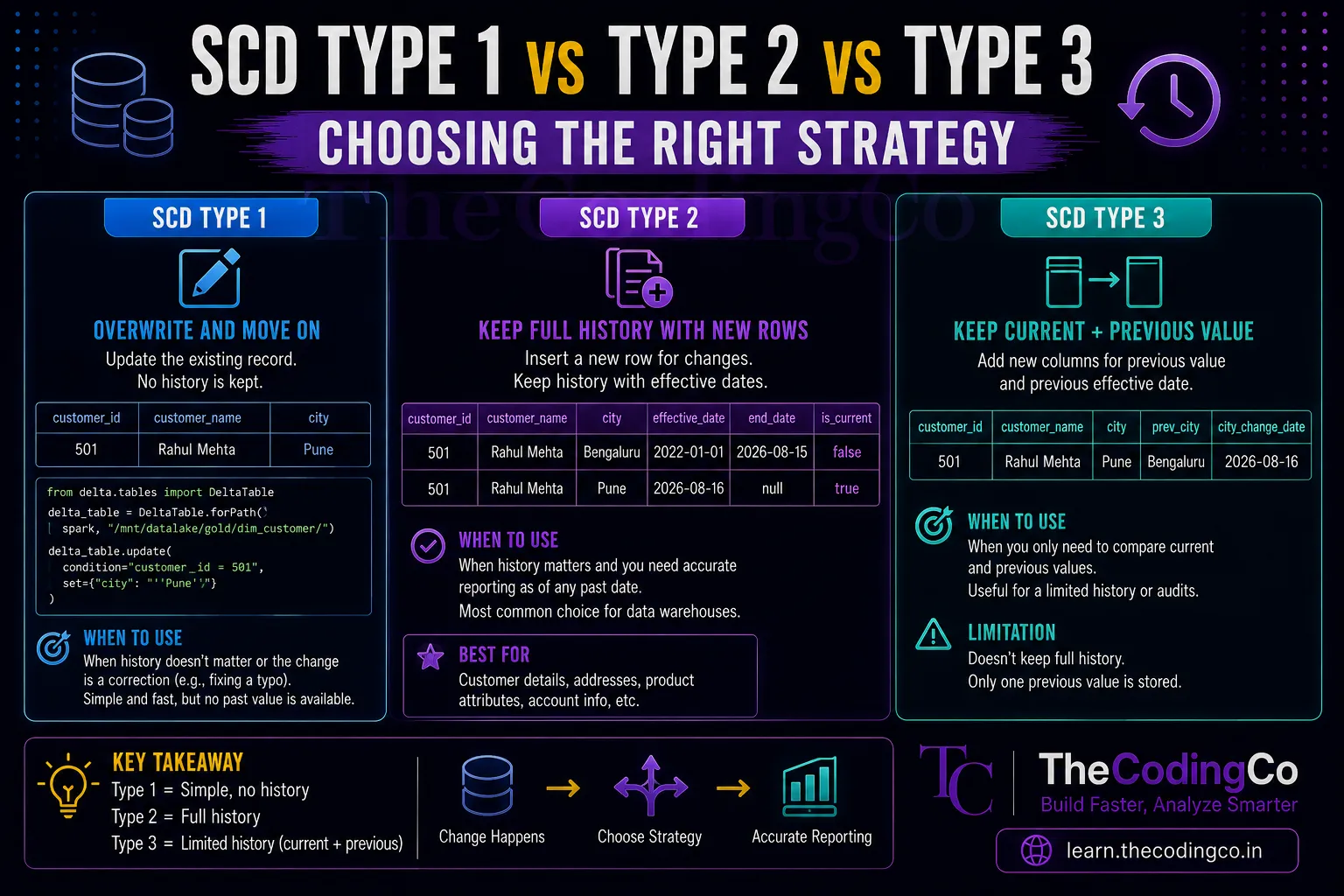
If you already understand SCD Type 1 as a concept, the idea is simple. When a dimension value changes, overwrite the old value with the new one, no history kept. But once you actually sit down to implement this in Delta Lake, you realize there are two genuinely different ways to do that overwrite, and they behave very differently depending on your situation. This trips people up because both approaches technically achieve the same end result, just through very different mechanics.
The overwrite approach
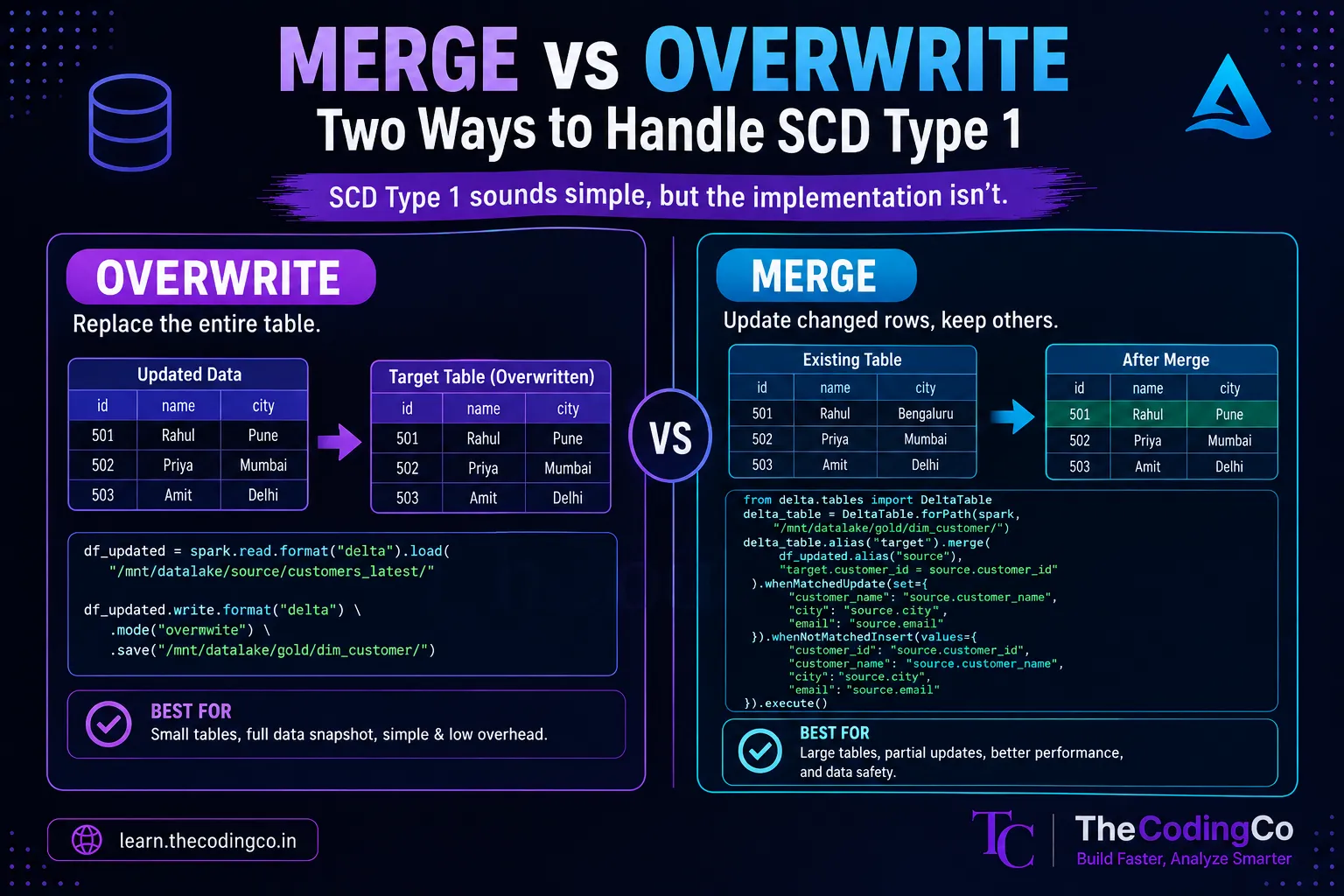
The most literal interpretation of Type 1 is exactly what it sounds like. You take your entire updated dataset, and you overwrite the entire target table with it.
df_updated = spark.read.format("delta").load("/mnt/datalake/source/customers_latest/")

df_updated.write.format("delta") \
    .mode("overwrite") \
    .save("/mnt/datalake/gold/dim_customer/")
This replaces the entire table's contents with whatever is in df_updated. Every row, whether it changed or not, gets rewritten.
When this makes sense This approach works well when your source data represents a full, complete snapshot every time, and the table is small enough that rewriting the whole thing is cheap. A good example is a small reference table, like a list of product categories, that gets refreshed daily from a source system that always sends the complete current list. Rewriting the entire table each time is simple, and there is no meaningful downside since the table is small.
Where it breaks down The problem shows up once your table grows large. If Dim_Customer has ten million rows, and only five hundred of them actually changed today, a full overwrite still rewrites all ten million rows, every single time. That is a lot of wasted compute and I/O for a small number of actual changes, and this cost only grows as the table gets bigger over time.
There is also a more subtle risk. A full overwrite assumes your source data for this run is genuinely complete and correct. If something goes wrong upstream, and your source dataset for today is accidentally missing a chunk of records, a full overwrite will happily replace your entire table with that incomplete data, silently losing records that were correct in yesterday's version. There is no partial update protection here, it is all or nothing.
The merge approach
The alternative is using Delta Lake's MERGE command, which compares incoming data against the existing table, and only updates the rows that actually changed, while leaving everything else untouched.
from delta.tables import DeltaTable

delta_table = DeltaTable.forPath(spark, "/mnt/datalake/gold/dim_customer/")

delta_table.alias("target").merge(
    df_updated.alias("source"),
    "target.customer_id = source.customer_id"
).whenMatchedUpdate(set={
    "customer_name": "source.customer_name",
    "city": "source.city",
    "email": "source.email"
}).whenNotMatchedInsert(values={
    "customer_id": "source.customer_id",
    "customer_name": "source.customer_name",
    "city": "source.city",
    "email": "source.email"
}).execute()
This says, for every row where the customer_id matches an existing row, update it with the new values. For any row that does not exist yet, insert it as a new row. Rows in the target table that were not touched by this merge are left completely alone.
When this makes sense This is the better choice for larger tables, or whenever your incoming data represents only changed or new records rather than a full snapshot. If you are only receiving the five hundred customers who actually changed today, rather than all ten million, merge lets you apply just those changes efficiently, without touching the rest of the table.
It is also generally safer, since it does not carry the same all or nothing risk as a full overwrite. If your incoming dataset today happens to be incomplete for some reason, a merge simply will not update the rows that were not included, rather than wiping out the entire table's contents.
The trade off Merge operations are more computationally expensive per operation than a plain overwrite, since Delta Lake has to actually compare incoming records against existing ones to figure out what changed. For very small tables, this comparison overhead can actually make merge slower than just rewriting the whole thing. This is why the right choice genuinely depends on your specific situation, not a fixed rule that one is always better.
A rough way to decide between them
- If your source data is always a small, complete snapshot, and the table itself is small enough that rewriting it entirely is fast and cheap, overwrite mode is simpler and perfectly reasonable. This fits well for smaller reference or lookup tables.
- If your table is large, and especially if your source data represents only incremental changes rather than a full refresh every time, merge is almost always the better choice, since it avoids unnecessary reprocessing of unchanged rows and reduces the blast radius if something upstream goes wrong.
- A useful mental check is asking how many rows in this table actually change on a typical run, compared to the table's total size. If that ratio is small, like five hundred changed rows out of ten million total, merge is clearly the more efficient approach. If the ratio is close to the whole table changing anyway, the overhead of a merge comparison might not be worth it over a simple overwrite.
A performance note worth knowing
One detail that trips people up when merge feels slower than expected is missing an appropriate partitioning or Z-Ordering strategy on the target table. Without this, Delta Lake has to scan a much larger portion of the table than necessary to find matching rows during the merge comparison. Partitioning the target table on a column commonly used in the merge condition, or applying Z-Ordering on that column, can meaningfully speed up merge performance on larger tables.
spark.sql("OPTIMIZE delta.`/mnt/datalake/gold/dim_customer/` ZORDER BY (customer_id)")
This is worth mentioning specifically because a lot of people assume merge is just inherently slow, when often the real issue is a missing optimization step rather than a fundamental limitation of the approach.
Interview angle
If asked how you would implement SCD Type 1, mentioning both approaches, and explaining that the right choice depends on table size and whether the source data is a full snapshot or an incremental change set, shows a more grounded understanding than just saying you would use MERGE by default. If pushed further on performance, bringing up Z-Ordering or partitioning as a way to speed up merge on large tables demonstrates that you understand this beyond just the syntax.
Quick recap
Both full overwrite and MERGE can implement SCD Type 1, but they behave very differently underneath. Overwrite mode rewrites the entire table every time, which is simple and fine for small tables with complete source snapshots, but wasteful and risky at scale. MERGE only updates the rows that actually changed, making it the better choice for larger tables or incremental source data, at the cost of more computational overhead per operation, which can be mitigated with proper partitioning or Z-Ordering on the target table.