ADF vs Synapse Pipelines vs Databricks Workflows, Decision Framework
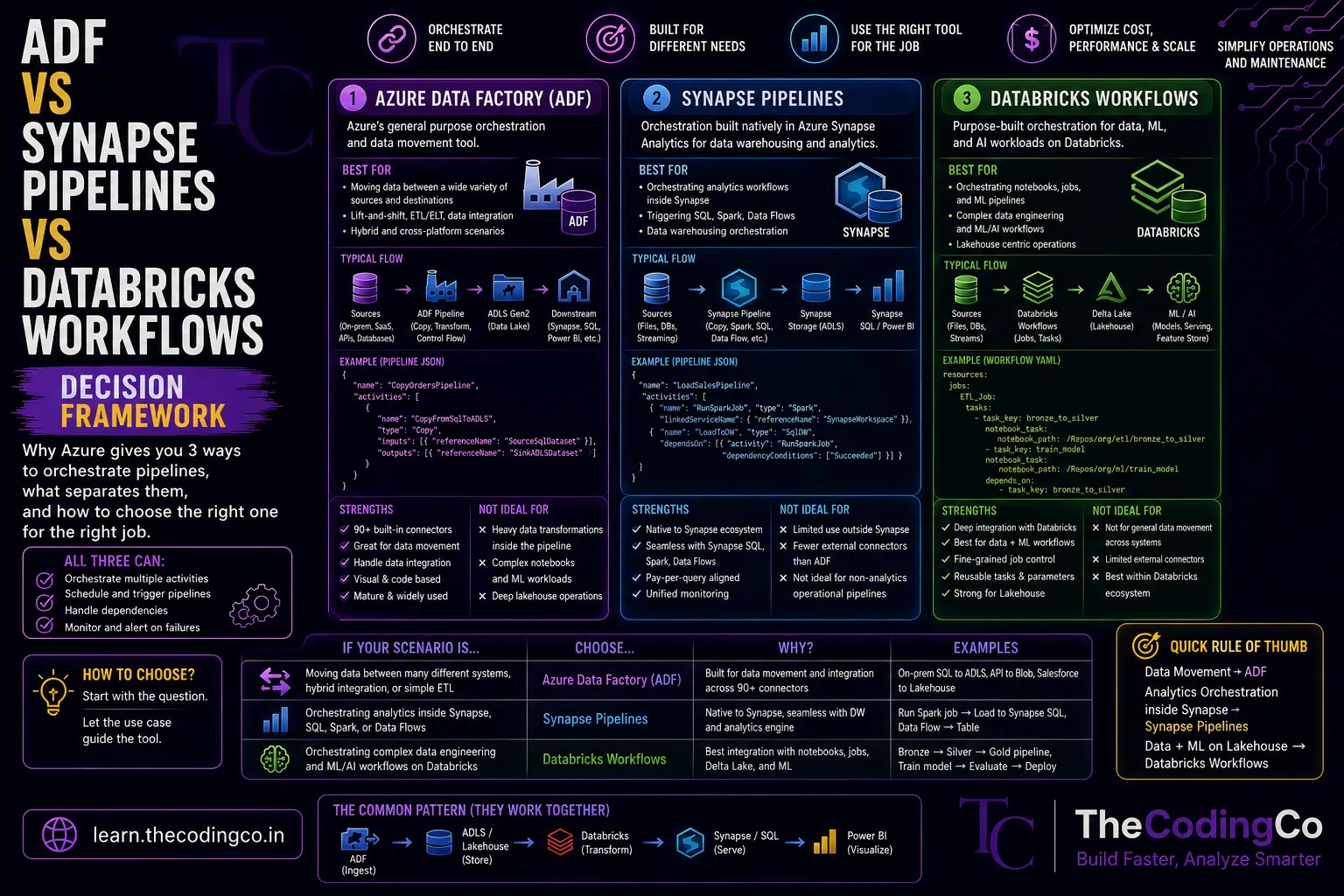
Why Azure gives you three different ways to orchestrate pipelines, what actually separates them under the hood, and how to decide which one fits a given situation.
Why Azure has three tools that seem to do the same thing
The first time I looked into this, it genuinely felt redundant. Azure Data Factory, Synapse Pipelines, and Databricks Workflows all let you build a pipeline, schedule it, and chain steps together. So why does Microsoft give you three ways to do what looks like the same job.
The honest answer is that they are not really solving the exact same problem, even though they look similar on the surface. Once you understand what each one is actually built around, the choice usually becomes obvious for a given situation, rather than confusing.
Azure Data Factory
- Azure Data Factory, usually just called ADF, is Azure's general purpose orchestration and data movement tool. Its main strength is connecting to a huge number of different data sources, both inside and outside Azure, and moving data between them.
- Think of ADF as the tool you reach for when the main job is getting data from point A to point B, possibly across very different systems. Pulling data from an on premises SQL Server, an external REST API, a Salesforce instance, and an Azure SQL Database, all into Azure Data Lake Storage Gen2, is exactly the kind of job ADF is built for.
{
  "name": "CopyOrdersPipeline",
  "activities": [
    {
      "name": "CopyFromSqlToADLS",
      "type": "Copy",
      "inputs": [{ "referenceName": "SourceSqlDataset" }],
      "outputs": [{ "referenceName": "SinkADLSDataset" }]
    }
  ]
}
ADF pipelines are built visually, or through JSON definitions like the one above, and it has strong built in support for scheduling, triggers, and connecting to dozens of source and destination systems through its library of connectors.
Where ADF is not the strongest choice is heavy data transformation logic. It has Mapping Data Flows for this, which under the hood run on Spark, but for genuinely complex transformation work, most teams end up handing that part off to Databricks anyway, and using ADF mainly for orchestration and movement.
Synapse Pipelines
- Synapse Pipelines are, under the hood, essentially the same engine as Azure Data Factory, just embedded directly inside Azure Synapse Analytics. If you have used ADF before, Synapse Pipelines will feel almost identical, same activities, same triggers, same general structure.
- The real reason to use Synapse Pipelines over standalone ADF comes down to where the rest of your workload lives. If your organization has already standardized on Azure Synapse Analytics as its main analytics platform, meaning your SQL pools, your Spark pools, and your reporting all live inside Synapse, it often makes sense to keep your orchestration inside that same workspace too, rather than managing a separate ADF instance alongside it.
- This matters practically because it affects things like unified monitoring, shared security and access control, and simpler management, since everything sits under one workspace instead of being split across two separate Azure services.
- If your organization is not using Synapse as their central platform, and instead relies mainly on Databricks for transformation work, standalone ADF is usually the more natural fit, since there is no real benefit to routing everything through Synapse just for orchestration.
Databricks Workflows
- Databricks Workflows takes a different approach entirely. Instead of being a general purpose data movement tool, it is built specifically to orchestrate jobs that already live inside Databricks, meaning notebooks, Python scripts, and Spark jobs.
- If your entire transformation logic already lives in PySpark notebooks inside Databricks, using Databricks Workflows to chain those notebooks together, handle retries, and set dependencies between them, keeps everything in one place.
# A Databricks Workflow is typically defined through the UI or via the Jobs API,
# chaining together tasks like this conceptually:
# Task 1: ingest_raw_data notebook
# Task 2: clean_and_transform notebook (depends on Task 1)
# Task 3: write_to_gold_layer notebook (depends on Task 2)
The advantage here is tight integration. Since the workflow lives right alongside the notebooks it is running, debugging a failure is often faster, since you can jump straight from a failed task into the exact notebook and cell that failed, along with full Spark logs.
Where Databricks Workflows falls short is data movement from external systems. It is not built to be a general purpose connector library the way ADF is. If you need to pull data from a dozen different external source systems, you are usually still going to lean on ADF or some other ingestion tool to get that data into Azure first, and then use Databricks Workflows to orchestrate what happens to it after it lands.
A simple way to think about the split
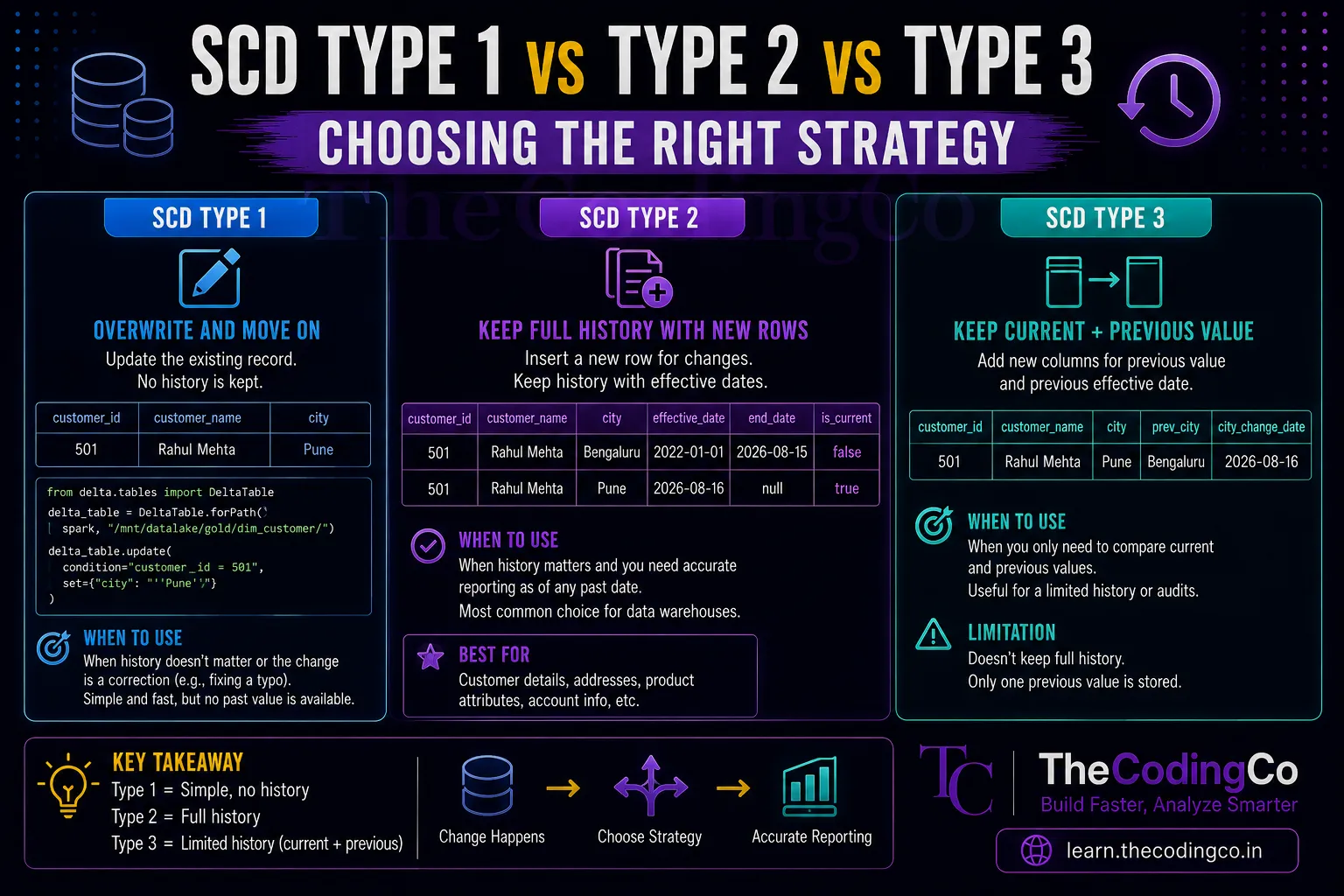
- ADF is strongest at moving data in from many different places, especially when sources are varied and external. Synapse Pipelines does the same job as ADF, but makes sense specifically when your organization already lives inside the Synapse ecosystem. Databricks Workflows is strongest at orchestrating what happens to data once it is already inside Databricks, especially when your transformation logic is Spark heavy and notebook based.
- A lot of real world Azure architectures actually use more than one of these together. A common pattern looks like this. ADF handles the initial ingestion, pulling data from various sources into the Bronze layer in ADLS Gen2. Databricks Workflows then takes over from there, orchestrating the notebooks that clean and transform data through Silver and Gold. ADF might then get triggered again afterward to move the final output somewhere else, like into Synapse for reporting.
Interview angle
- If asked to explain the difference between these three, the strongest answer avoids just listing features and instead focuses on what each tool is optimized for. ADF is optimized for broad connectivity and data movement. Synapse Pipelines is functionally the same engine, chosen mainly for organizational fit within a Synapse centric setup. Databricks Workflows is optimized for orchestrating Spark based transformation logic that already lives in Databricks.
- If asked which you would choose for a specific scenario, walk through the actual requirement rather than picking one by default. If the scenario mentions pulling data from many different external systems, lean toward ADF. If it mentions chaining together several PySpark notebooks with dependencies, lean toward Databricks Workflows.
Quick recap
Azure Data Factory is a general purpose orchestration and data movement tool with strong connector support, ideal for bringing data in from many different sources. Synapse Pipelines runs on the same underlying engine as ADF, but fits naturally when your organization is already centered around Azure Synapse. Databricks Workflows is purpose built for orchestrating Spark jobs and notebooks that live inside Databricks, and tends to be the better choice once data is already inside the platform and needs to move through transformation stages. Many real Azure setups use a combination of these rather than relying on just one.