AWS Data Engineering Tools Explained, Where Each One Fits
A practical walkthrough of the core AWS data engineering tools, mapped against the same pipeline structure familiar from Azure, useful context for anyone whose main focus is Azure but wants to understand how AWS compares.
Why this is worth understanding even if Azure is your main focus
Even if your day to day work and career are centered on Azure, understanding roughly how AWS's equivalent tools work is genuinely useful. Job postings sometimes list AWS experience as a nice to have even for primarily Azure roles, interviewers sometimes ask about it to see how well your understanding transfers, and if you ever end up at a company using AWS, having this mental map already in place saves a lot of ramp up time.
The good news, as covered in the Azure versus AWS versus GCP comparison, is that the underlying concepts do not change. Let's walk through the same retail sales pipeline example, this time built with AWS tools, to make the comparison concrete.
Amazon S3, the storage foundation
Just as Azure Data Lake Storage Gen2 serves as the central storage layer in an Azure pipeline, Amazon S3 plays that same role in AWS. Raw and processed data sits in S3 buckets, typically still organized following the same Bronze, Silver, Gold layering pattern.
s3://retail-datalake/bronze/sales/
s3://retail-datalake/silver/sales/
s3://retail-datalake/gold/sales_summary/
S3 is extremely widely used, not just for data engineering but across almost every kind of AWS workload, and it functions conceptually the same way ADLS Gen2 does, cheap, durable, scalable storage that other services read from and write to.
AWS Glue, for ingestion and orchestration
AWS Glue is the closest equivalent to Azure Data Factory, though it works somewhat differently under the hood. Glue is primarily a serverless ETL service, meaning it can both move data between systems and run transformation jobs, often using Spark under the hood, similar in spirit to how ADF's Mapping Data Flows work.
# A simplified AWS Glue job script, conceptually similar
# to a Databricks transformation notebook
import sys
from awsglue.context import GlueContext
from pyspark.context import SparkContext

sc = SparkContext()
glueContext = GlueContext(sc)

df = glueContext.create_dynamic_frame.from_catalog(
    database="retail_db",
    table_name="raw_sales"
)

df_transformed = df.toDF().dropDuplicates(["sale_id"])
Glue also includes a Data Catalog, which functions similarly to a metadata layer describing what data exists and its schema, something that in Azure is often handled partly through Unity Catalog in Databricks, or through Synapse's built in metadata management.
For orchestrating more complex multi step workflows with conditional logic, AWS Step Functions is often used alongside Glue, filling a role somewhat similar to how ADF pipelines chain together multiple activities with dependencies.
AWS EMR and Databricks on AWS, for heavier Spark processing
For larger scale, more customizable Spark processing, AWS EMR, short for Elastic MapReduce, is the more traditional AWS native option, giving you a managed Spark cluster with more manual control than Glue typically offers.
It is also worth knowing that Databricks itself runs natively on AWS, not just Azure, meaning teams already comfortable with Databricks and Delta Lake on Azure can often transfer that exact same skill set directly onto an AWS based project, since the notebook environment, PySpark syntax, and Delta Lake behavior remain largely the same regardless of which cloud is running underneath it.
# This PySpark and Delta Lake code looks nearly identical
# whether running on Azure Databricks or Databricks on AWS
df_silver = (df_bronze.dropDuplicates(["sale_id"])
                       .filter(df_bronze.sales_amount > 0))

df_silver.write.format("delta").mode("append").save("s3://retail-datalake/silver/sales/")
This is genuinely one of the more reassuring facts for someone focused on Azure, since Databricks skills are largely cloud agnostic even though the surrounding orchestration and storage tools differ.
Amazon Redshift, the data warehouse layer
Amazon Redshift serves the same role that Azure Synapse Dedicated SQL Pool serves on Azure, a dedicated data warehouse built for fast SQL queries across large volumes of structured data, typically sitting downstream of the transformation layer, ready to be queried by reporting tools.
SELECT
    store_region,
    SUM(sales_amount) AS total_sales
FROM gold.sales_summary
WHERE sale_date >= DATEADD(day, -30, GETDATE())
GROUP BY store_region;
The SQL itself looks nearly identical to what you would write against Synapse, since both are built on relatively standard SQL syntax with some platform specific extensions.
Amazon Kinesis, for streaming data
Where Azure uses Event Hubs for streaming ingestion, AWS uses Amazon Kinesis to serve a similar purpose, capturing continuous streams of data, like clickstream events or IoT sensor readings, and making them available for real time or near real time processing, often feeding into Glue streaming jobs or directly into a Spark streaming job on EMR or Databricks.
Amazon QuickSight, for reporting
QuickSight is AWS's native business intelligence tool, roughly comparable to Power BI in what it does, connecting to a data warehouse like Redshift and building dashboards for business users. In practice, a lot of AWS based companies actually use Power BI or Tableau instead of QuickSight, since BI tool choice tends to be less tightly coupled to a specific cloud platform than the underlying data infrastructure is.
AWS IAM, for access and security
Where Azure uses Azure Active Directory and role based access control, AWS uses IAM, short for Identity and Access Management, to control who and what can access various AWS resources. The underlying concept is the same, defining roles and permissions so that services and people only have access to exactly what they need, even though the specific configuration mechanics differ between the two platforms.
Putting the full picture together
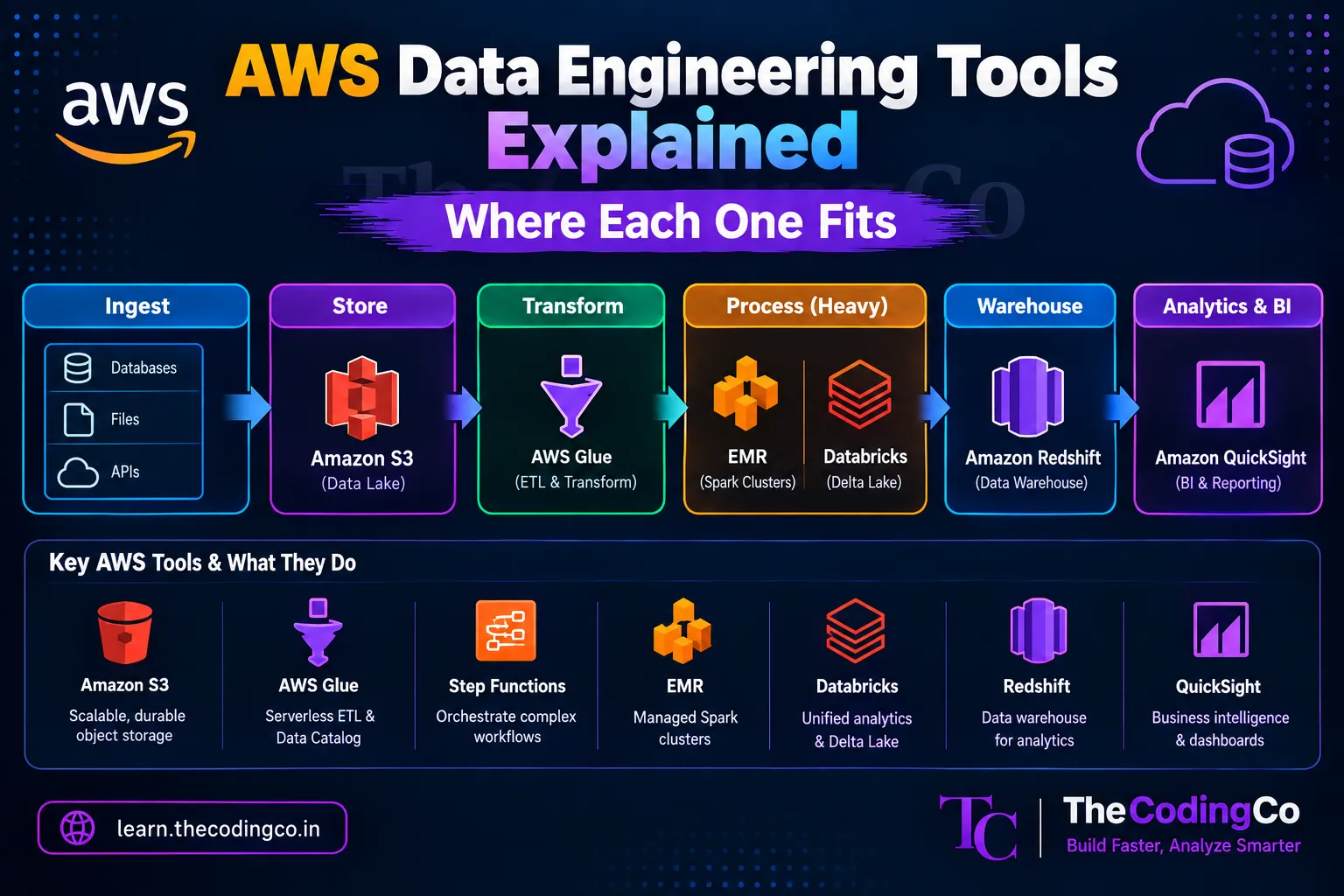
Mapped against the same retail pipeline example used for Azure, the flow on AWS looks like this. Amazon S3 serves as the central storage layer, following the same Bronze, Silver, Gold structure. AWS Glue, sometimes alongside EMR or Databricks on AWS, handles ingestion and transformation. Amazon Redshift serves fast SQL queries against the finished data. Amazon Kinesis handles any streaming ingestion needs. And QuickSight, or often Power BI regardless of the underlying cloud, delivers the final dashboards to business users, with IAM handling access control throughout.
What this means practically for someone focused on Azure
If your career is centered on Azure, there is no need to go build deep AWS expertise preemptively. But having this rough mapping in your head means that if AWS ever comes up, whether in an interview question or an actual job change down the line, you are translating familiar concepts into new service names, rather than starting from zero. This is especially true for Databricks specifically, since that skill set carries over almost entirely unchanged.
Interview angle
If an interviewer asks whether you have AWS experience and your background is primarily Azure, being able to say that you understand the conceptual mapping, for example that Glue plays a role similar to ADF, and that Redshift is comparable to Synapse, demonstrates real platform agnostic understanding, even without hands on AWS experience. This tends to land much better than either overstating unfamiliar experience or simply saying you only know Azure.
Quick recap
AWS's core data engineering tools map fairly directly onto their Azure equivalents. Amazon S3 mirrors ADLS Gen2 for storage. AWS Glue, along with Step Functions, plays a role similar to Azure Data Factory for ingestion and orchestration. EMR and Databricks on AWS handle large scale Spark processing, with Databricks skills transferring almost entirely unchanged from Azure. Amazon Redshift mirrors Azure Synapse for data warehousing. Amazon Kinesis mirrors Azure Event Hubs for streaming. And IAM handles access control the way Azure Active Directory and RBAC do on Azure. Understanding this mapping is valuable context even for someone whose primary focus remains Azure.