Azure for Data Engineers, Complete Roadmap from Basics to Advanced
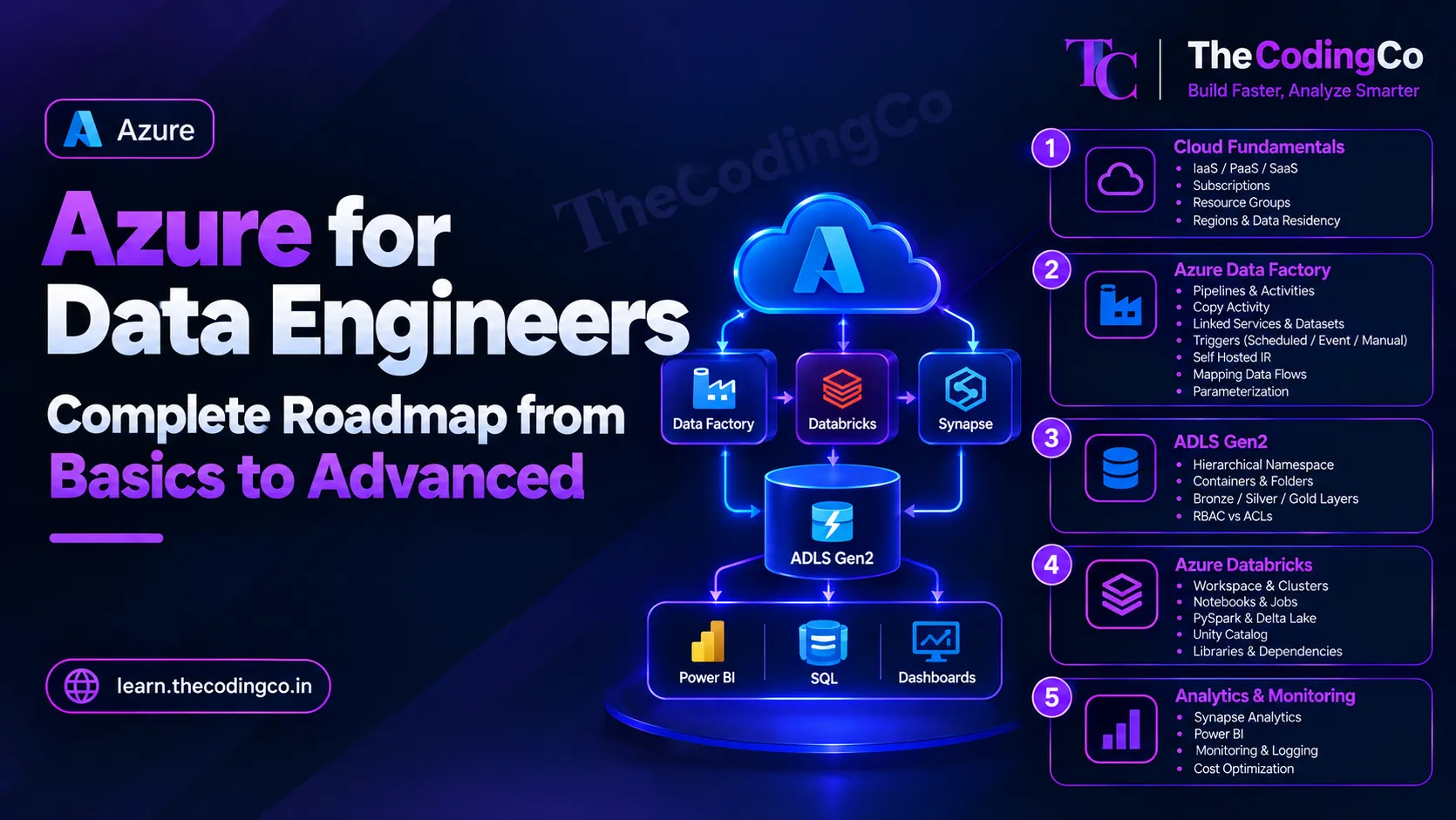
A proper syllabus for the Azure data engineering stack, covering exactly which services to learn, in what order, and where each one actually shows up in a real production pipeline rather than as an isolated tool name.
Why this roadmap is organized around one pipeline, not a list of services
By the time most people reach the Azure stage of learning data engineering, they already have solid SQL, Python, and PySpark fundamentals, and the temptation is to just start collecting service names, Data Factory, Databricks, Synapse, without a clear picture of how they connect. This roadmap is deliberately organized differently, around one realistic pipeline from a source system all the way to a business dashboard, since that is genuinely the only way these services start making sense together instead of being a pile of separate facts.
Each stage tells you what to learn and where it fits into that real pipeline, and ends with a quick reference list of the exact concepts covered, so if you already know a topic, you can glance at it and move ahead. A quick note on background, this roadmap assumes Azure as the primary platform, since that is genuinely one of the most common environments for data engineering roles, but I have called out the equivalent AWS and GCP services along the way, and the on premises to cloud mapping too, so this genuinely helps you regardless of where you are coming from.
Stage 1: Cloud Fundamentals Before Touching Any Specific Service
Before learning Data Factory or Databricks specifically, get comfortable with a few foundational cloud ideas, since these show up as assumed knowledge in almost every Azure conversation afterward.
Understand the basic difference between infrastructure as a service, platform as a service, and software as a service, and roughly where a service like Databricks or Data Factory sits on that spectrum, since it is a platform you configure and use rather than raw infrastructure you manage entirely yourself. Learn Azure's basic organizational structure, a subscription as the billing and access boundary, resource groups as a way to logically group related resources together, and regions as the actual physical locations where your resources run, which matters directly for data residency and latency considerations.
Real scenario, understanding resource groups properly matters the very first time you need to figure out why a Databricks workspace cannot see a storage account, which often comes down to permissions or networking configured at the resource group or subscription level rather than anything wrong with the pipeline code itself.
Quick reference, stage one
- infrastructure as a service, platform as a service, software as a service
- subscriptions
- resource groups
- regions and data residency
Stage 2: Azure Data Factory, Where The Pipeline Usually Begins
Data Factory is typically the entry point of a real Azure pipeline, so it deserves real depth rather than a surface level pass.
Learn pipelines and activities, understanding a pipeline as a container for a sequence of activities, and the Copy activity specifically, which is the most commonly used activity for pulling data from a source into storage. Learn linked services, which store the actual connection information to a source or destination, and datasets, which define the specific structure of data being read or written, understanding how these two work together rather than being redundant with each other.
Learn triggers, scheduling a pipeline to run on a fixed schedule, in response to an event like a new file arriving, or manually, and get a working understanding of integration runtime, specifically why a self hosted integration runtime is needed when Data Factory needs to reach a data source sitting inside a private network or on premises rather than something publicly accessible.
Mapping Data Flows deserve attention too, since they let you build visual, Spark powered transformation logic directly inside Data Factory without writing PySpark code yourself, which matters specifically for simpler transformation needs or for team members who are stronger in a visual tool than in code. Learn parameterization thoroughly, real scenario being building one single pipeline that can process any given date's data by passing the date in as a parameter, rather than building a separate pipeline for every single day or every single source table.
Quick reference, stage two
- pipelines and activities
- Copy activity
- linked services and datasets
- triggers, scheduled, event based, and manual
- self hosted integration runtime
- Mapping Data Flows
- parameterization for reusable pipelines
Stage 3: Azure Data Lake Storage Gen2, Where The Data Actually Lives
ADLS Gen2 is the central storage layer underneath almost everything else in a real Azure data pipeline, so understanding it properly matters more than its apparent simplicity suggests.
Learn the hierarchical namespace, which is what actually separates ADLS Gen2 from plain blob storage, giving you real folder like structure rather than flat file storage with folder names simulated through naming conventions. Learn containers as the top level grouping within a storage account, and get comfortable with how the Bronze, Silver, and Gold layer structure typically gets laid out as folders within these containers, and why that separation exists, raw data preserved exactly as it arrived in Bronze, cleaned data in Silver, and business ready aggregated data in Gold.
Learn the difference between access control through Azure role based access control, RBAC, applied broadly at the storage account or container level, versus access control lists, ACLs, which allow finer grained permissions down to a specific folder or file, real scenario being a situation where one team should only be able to read a specific folder within a shared container rather than the entire container.
Quick reference, stage three
- hierarchical namespace
- containers and folder structure
- Bronze, Silver, Gold layer organization
- RBAC versus ACLs for storage access
Stage 4: Azure Databricks, The Platform Side Specifically
Since the actual PySpark and Delta Lake concepts are covered in dedicated depth in the PySpark roadmap, this stage focuses specifically on the platform itself, the parts that are genuinely Databricks specific rather than Spark specific.
Learn how a Databricks workspace is organized, notebooks, folders, and repos, and understand cluster configuration properly, the difference between an all purpose cluster typically used for interactive development, and a job cluster that spins up specifically to run a scheduled job and shuts down afterward, which matters directly for cost, since a job cluster only exists for the duration of that specific job.
Learn Databricks Workflows for orchestrating multiple notebooks or jobs with dependencies between them, and learn how storage is typically accessed from within Databricks, either through direct paths using credentials, or through a mounted storage location, along with the more modern approach of accessing storage through Unity Catalog external locations rather than older mount based patterns. Learn dbutils specifically for working with secrets pulled from Key Vault rather than hard coded credentials sitting inside a notebook.
Quick reference, stage four
- workspace organization, notebooks, folders, repos
- all purpose clusters versus job clusters
- Databricks Workflows
- accessing storage, mounts versus Unity Catalog external locations
- dbutils and secrets
Stage 5: Azure Synapse Analytics, and Microsoft Fabric's Growing Role
Synapse Analytics typically sits between the Gold layer and the actual reporting layer, particularly for larger scale, fast SQL based reporting needs.
Learn the difference between a dedicated SQL pool, a provisioned, always billed resource meant for consistent heavy workloads, and serverless SQL pool, which is billed based on the data actually scanned per query rather than a constantly running resource, making it a genuinely better fit for less predictable or lighter querying needs. Learn Synapse pipelines too, which are conceptually very similar to Data Factory pipelines, since Synapse actually embeds a lot of the same orchestration engine underneath, and understand that some organizations use Synapse pipelines instead of a separate Data Factory instance specifically to keep orchestration and querying within one workspace.
Also get familiar with Microsoft Fabric at a working level, since it represents Microsoft's newer, more unified direction for analytics, bringing data engineering, data warehousing, and Power BI together under one platform built around a single shared storage layer called OneLake, and around the idea of a lakehouse, combining the flexibility of a data lake with the structure of a warehouse. You do not need deep hands on Fabric expertise immediately if your organization is still on the classic Synapse and Databricks stack, but understanding roughly where Fabric fits, and how it relates to the tools you already know, is genuinely worth having, since more organizations are actively evaluating or migrating toward it.
Quick reference, stage five
- dedicated SQL pool versus serverless SQL pool
- Synapse pipelines
- Microsoft Fabric, basic awareness
- OneLake and the lakehouse concept
Stage 6: Azure Key Vault and Identity, Running Quietly Underneath Everything
These pieces are less visible than the main data flow, but they matter for any real production setup, and interviewers do ask about them specifically.
Learn Azure Key Vault for storing sensitive values, database connection strings, API keys, and secrets, so that nothing sensitive is ever hard coded directly into a pipeline or a notebook. Learn Managed Identity properly, understanding it as a way for a service like Data Factory or Databricks to authenticate to another Azure resource, like storage or Key Vault itself, without needing separately managed credentials at all. Learn the difference between a system assigned managed identity, tied directly to one specific resource and deleted along with it, and a user assigned managed identity, created independently and able to be attached to multiple resources at once.
Real scenario, this genuinely matters the first time a pipeline needs to read a secret from Key Vault, understanding that granting the Data Factory's managed identity access to that specific Key Vault, rather than embedding a connection string directly inside the pipeline, is exactly the difference between a secure setup and a real security risk waiting to be discovered later.
Quick reference, stage six
- Azure Key Vault
- Managed Identity
- system assigned versus user assigned managed identity
- service principals, basic awareness
Stage 7: Monitoring, Logging, And Knowing When Something Actually Broke
A pipeline that fails silently is genuinely one of the more common and costly problems in real data engineering work, so monitoring deserves dedicated attention rather than being an afterthought.
Learn Azure Monitor and Log Analytics at a working level, understanding that these collect and let you query logs and metrics across your Azure resources centrally. Learn how to monitor Data Factory pipeline runs directly, checking activity level success and failure, and how to set up alerts so a failure actually notifies someone rather than sitting unnoticed until a business user complains about a missing or wrong number. Learn the basics of monitoring a Databricks job too, understanding job run history and being able to trace back to which specific notebook cell or step actually failed.
Quick reference, stage seven
- Azure Monitor and Log Analytics
- Data Factory pipeline run monitoring
- alerts for pipeline failures
- Databricks job run monitoring
Stage 8: Security and Governance Across the Platform
Learn how Azure role based access control works broadly across the platform, not just for storage specifically, understanding roles as a way of granting a specific set of permissions to a user, group, or managed identity at a particular scope, a subscription, a resource group, or an individual resource. Learn the basic role of Microsoft Entra ID, formerly known as Azure Active Directory, as the identity system underneath almost all of this, managing users, groups, and service principals.
Get a working understanding of network level security too, private endpoints, which let a service like storage or Databricks be reached only through a private network path rather than the public internet, and virtual networks generally, since regulated environments, especially in finance or healthcare, often require this level of network isolation as a hard requirement rather than an optional extra. If your environment uses Unity Catalog on Databricks, learn its role in centralizing data governance and access control across an entire organization's workspaces, rather than managing permissions separately in every individual workspace.
Quick reference, stage eight
- Azure role based access control across the platform
- Microsoft Entra ID, formerly Azure Active Directory
- private endpoints and virtual networks
- Unity Catalog for centralized governance
Stage 9: CI CD and Treating Pipelines Like Real Software
Learn the basics of using Azure DevOps or GitHub Actions to deploy Data Factory pipelines and Databricks notebooks through a proper release process rather than manually clicking through the Azure portal for every change. Learn how Data Factory pipelines are typically exported and deployed using ARM templates, or increasingly Bicep, and how Databricks notebooks are usually version controlled through Databricks Repos connected directly to a Git repository, letting changes go through the same pull request and review process as any other piece of real software.
Real scenario, this matters the first time a change needs to move safely from a development environment to production without accidentally overwriting someone else's work or deploying an untested change directly into a live pipeline that the business depends on.
Quick reference, stage nine
- Azure DevOps or GitHub Actions for deployment
- ARM templates and Bicep for Data Factory deployment
- Databricks Repos and Git integration
- moving changes through development, test, and production environments
Stage 10: Power BI, Enough To Understand The Very End Of The Pipeline
You do not need to become a full BI developer, but understanding the very end of the pipeline genuinely helps you build better Gold layer tables, since you will understand exactly how they are actually consumed.
Learn the basic difference between Import mode, where Power BI loads a full copy of the data into its own internal engine, and DirectQuery, where Power BI queries the underlying source directly every time a report is opened or refreshed, and understand the real trade off, Import is generally faster to interact with but needs a refresh schedule, while DirectQuery always shows current data but depends entirely on the underlying source's own query performance. A basic awareness of DAX, the formula language behind Power BI measures, is worth having too, mainly so you can have an informed conversation with a BI developer about why a Gold layer table is structured the way it is.
Quick reference, stage ten
- Import mode versus DirectQuery
- basic DAX awareness
- how Gold layer table design affects downstream reporting
Stage 11: Cost Awareness and Optimization
Cost genuinely becomes a real, ongoing conversation once you are working on production pipelines, and understanding it is a strong signal of real world maturity in an interview.
Learn cluster autoscaling in Databricks, letting a cluster grow and shrink based on actual workload rather than running at a fixed, potentially wasteful size constantly. Learn to think about choosing an appropriate cluster size and virtual machine type for the actual workload rather than defaulting to the largest available option out of habit. Learn storage tiering in ADLS Gen2, hot, cool, and archive tiers, and why older, rarely accessed Bronze layer data might genuinely belong in a cheaper, cooler tier rather than the default hot tier. And understand why a dedicated Synapse SQL pool sitting idle and still running is a real, avoidable cost, and why pausing it when not actively in use matters.
Quick reference, stage eleven
- Databricks cluster autoscaling
- choosing appropriate cluster size and VM type
- ADLS Gen2 storage tiers, hot, cool, archive
- pausing a dedicated Synapse SQL pool when idle
A note if you are coming from a different cloud or on premises background
If you are coming from AWS, the conceptual mapping is fairly direct, S3 maps closely onto ADLS Gen2, Glue maps roughly onto Data Factory and parts of Databricks, Redshift maps onto Synapse dedicated SQL pool, and IAM roles map onto Azure's role based access control and managed identity concepts, so most of your existing cloud thinking transfers, the real work is learning Azure specific terminology and portal layout.
If you are coming from GCP, Cloud Storage maps onto ADLS Gen2, Dataflow and Dataproc map onto parts of Data Factory and Databricks, BigQuery maps onto Synapse, particularly its serverless model, and Cloud IAM maps onto Azure's access control concepts, again meaning your underlying cloud data engineering thinking is very much still valid here.
If you are coming from an on premises background, particularly SQL Server with SSIS, your SQL and ETL logic thinking transfers well, SSIS packages conceptually map onto Data Factory pipelines and Mapping Data Flows, and your real learning curve is mainly around cloud specific concepts, identity, networking, and storage tiers, that an on premises environment typically did not require you to think about in the same way.
How to actually practice this instead of just reading it
Set up a small but genuinely complete pipeline in a free or low cost Azure environment, pulling a small dataset using Data Factory into ADLS Gen2, transforming it through Bronze, Silver, and Gold layers in Databricks, securing credentials properly through Key Vault and Managed Identity rather than hard coding anything, and connecting the final Gold layer table to a simple Power BI report. Doing this once, properly, including the security and monitoring pieces, teaches you dramatically more than reading about each service separately, since real interviews and real jobs test exactly this kind of connected, end to end understanding.
Interview angle
If asked to explain your Azure experience, walk through a real pipeline scenario rather than listing service names in isolation. Saying something like, I built a pipeline where Data Factory pulls raw data into ADLS Gen2 on a schedule, Databricks cleans and models it through Bronze, Silver, and Gold layers, credentials are handled through Key Vault and a managed identity rather than hard coded values, and the final Gold tables feed a Power BI report, immediately demonstrates a genuinely connected, production minded understanding, which is exactly what separates someone who has only used these tools individually from someone who has actually built with them together.
Quick recap
Start with basic cloud concepts, subscriptions, resource groups, and regions, before diving into individual services. Learn Data Factory thoroughly as the usual starting point of a pipeline, understand ADLS Gen2 and the Bronze, Silver, Gold layering pattern as the storage backbone, and treat Databricks platform knowledge, clusters, workflows, and Unity Catalog, as a separate skill from the PySpark code itself. Learn Synapse Analytics and get a working sense of where Microsoft Fabric fits into the bigger picture, then build real depth in the pieces that quietly run underneath everything, Key Vault, managed identity, monitoring, security, and CI CD, since these are exactly the areas that distinguish someone who has only built toy pipelines from someone who has genuinely worked in production. Round it out with enough Power BI awareness to understand how your Gold layer tables actually get used, and enough cost awareness to talk credibly about running a pipeline efficiently, not just correctly. Whether you are coming from AWS, GCP, or an on premises background, the underlying data engineering thinking transfers directly, only the specific service names and platform details change.