GCP Data Engineering Tools Explained, Where Each One Fits
A practical walkthrough of the core GCP data engineering tools, mapped against the same pipeline structure used for Azure and AWS, with a closer look at what makes BigQuery genuinely different.
Where GCP fits into this comparison
Having gone through Azure and AWS using the same retail sales pipeline example, GCP is worth covering the same way, both for completeness and because BigQuery specifically represents a genuinely different approach compared to Synapse or Redshift, worth understanding on its own terms rather than just as another item on a comparison list.
Google Cloud Storage, the storage foundation
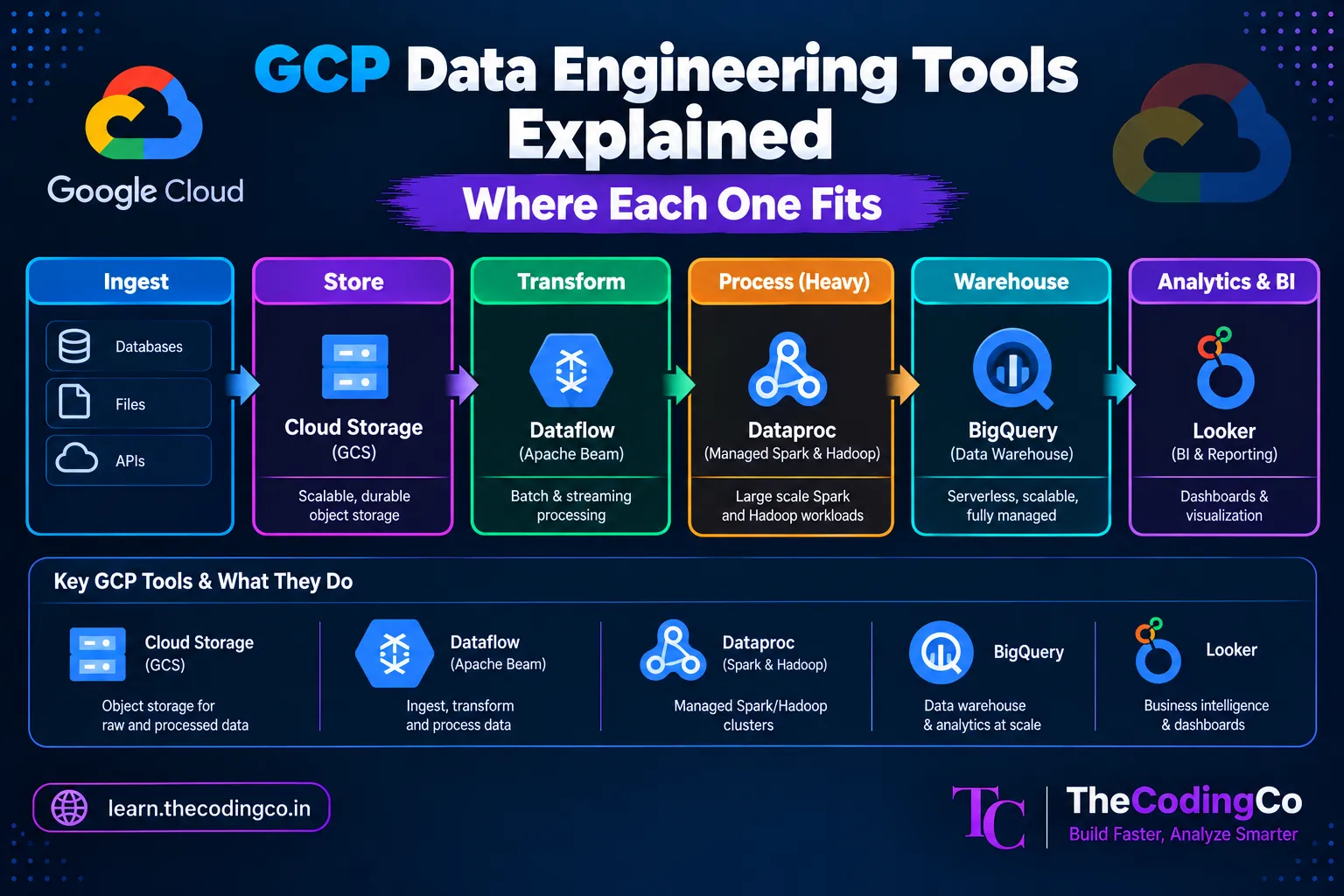
Google Cloud Storage, usually just called GCS, plays the same role that ADLS Gen2 and S3 play on their respective clouds, serving as the central storage layer where raw and processed data lives, typically still organized following the same Bronze, Silver, Gold structure.
gs://retail-datalake/bronze/sales/
gs://retail-datalake/silver/sales/
gs://retail-datalake/gold/sales_summary/
Functionally, this works almost identically to how ADLS Gen2 or S3 behave, cheap, durable object storage that other GCP services read from and write to.
Dataflow, for processing and transformation
Google Cloud Dataflow is GCP's managed data processing service, built on Apache Beam, and it handles both batch and streaming transformation workloads. This is roughly where a lot of the work that Azure Databricks or AWS Glue would handle happens on GCP, though Dataflow's underlying programming model, based on Apache Beam, is somewhat different from straightforward PySpark code.
# A simplified Apache Beam pipeline, conceptually similar
# to a Databricks PySpark transformation
import apache_beam as beam

with beam.Pipeline() as pipeline:
    (pipeline
     | "ReadSales" >> beam.io.ReadFromText("gs://retail-datalake/bronze/sales/*.json")
     | "FilterValid" >> beam.Filter(lambda row: row["sales_amount"] > 0)
     | "WriteSilver" >> beam.io.WriteToText("gs://retail-datalake/silver/sales/"))
It is worth knowing that Databricks also runs on GCP, similar to how it runs on both Azure and AWS, so teams already comfortable with PySpark and Delta Lake can use that same familiar approach on GCP as well, rather than being forced into the Apache Beam programming model specifically.
Dataproc, for more traditional Spark and Hadoop workloads
For teams wanting a more direct, managed Spark or Hadoop cluster experience, closer to how AWS EMR works, GCP offers Dataproc. This tends to be the more familiar option for someone coming from a PySpark background who wants code that looks closer to what they would write in Databricks, rather than adapting to the Apache Beam model that Dataflow is built around.
BigQuery, the standout piece of the GCP data stack
BigQuery is genuinely worth spending more time on than a simple comparison table would suggest, because it represents a meaningfully different approach compared to Azure Synapse or Amazon Redshift. Where Synapse and Redshift generally require some thought around cluster or pool sizing, BigQuery is fully serverless, meaning there is no cluster to manage or size at all. You simply run a query, and BigQuery handles the underlying compute scaling automatically.
SELECT
    store_region,
    SUM(sales_amount) AS total_sales
FROM `retail_project.gold.sales_summary`
WHERE sale_date >= DATE_SUB(CURRENT_DATE(), INTERVAL 30 DAY)
GROUP BY store_region;
The SQL syntax itself looks familiar, similar to what you would write against Synapse or Redshift, but the underlying pricing and performance model is different. BigQuery is commonly billed based on the amount of data actually scanned by a query, rather than on cluster uptime, which changes how you think about cost. A poorly written query that scans an entire massive table unnecessarily can become expensive quickly, even though there is no cluster sitting there costing money in the background the way an idle Synapse pool would.
This also means query optimization in BigQuery often focuses specifically on minimizing the amount of data scanned, through techniques like partitioning tables by date and clustering on frequently filtered columns, which is conceptually similar to why partitioning and Z-Ordering matter in Delta Lake, just applied within a different underlying system.
Pub/Sub, for streaming data
Where Azure uses Event Hubs and AWS uses Kinesis, GCP uses Pub/Sub for capturing and distributing streaming data, like real time clickstream events or sensor data, which then typically flows into Dataflow for real time processing.
Looker, for reporting
Looker is Google's BI and reporting tool, playing a role similar to Power BI or QuickSight, connecting to BigQuery and building dashboards for business users. Looker has a somewhat different approach compared to Power BI, built around a modeling layer called LookML that defines reusable business logic centrally, which some teams find helps keep metric definitions more consistent across different reports, though it does come with its own learning curve.
Cloud IAM, for access and security
GCP's Cloud IAM handles access control the way Azure Active Directory and RBAC do on Azure, or IAM does on AWS, defining who and what can access specific GCP resources and services.
Putting the full picture together
Mapped against the same retail pipeline example, the GCP flow looks like this. Google Cloud Storage serves as the central storage layer. Dataflow, or Dataproc for more traditional Spark workloads, handles transformation. BigQuery serves fast, serverless SQL queries against the finished data. Pub/Sub handles streaming ingestion needs. And Looker, or sometimes Power BI regardless of the underlying cloud, delivers dashboards to business users, with Cloud IAM managing access control throughout.
Why BigQuery specifically tends to come up in conversation
If GCP comes up at all in an Azure focused conversation or interview, it is often specifically because of BigQuery, since its serverless model and scan based pricing represent a genuinely different way of thinking about data warehousing compared to the cluster based model that Synapse and Redshift both use. Being able to speak to that specific difference, rather than treating BigQuery as just another warehouse with a different name, tends to be more useful than a full breakdown of every GCP service.
Interview angle
If asked about GCP and your background is Azure focused, being able to specifically explain how BigQuery's serverless, scan based pricing model differs from Synapse's cluster based approach shows a more meaningful understanding than a generic tool mapping. Mentioning that Databricks itself runs on GCP as well, meaning PySpark and Delta Lake skills transfer over even without deep GCP native tool experience, is also a strong point to bring up if pushed further on this.
Quick recap
GCP's core data engineering tools map onto familiar roles from Azure and AWS. Google Cloud Storage mirrors ADLS Gen2 and S3 for storage. Dataflow, built on Apache Beam, along with Dataproc for more traditional Spark workloads, handles transformation. BigQuery stands out specifically for its fully serverless, scan based pricing model, a genuinely different approach compared to Synapse or Redshift. Pub/Sub mirrors Event Hubs and Kinesis for streaming. Looker serves the BI and reporting role, built around a centralized modeling layer. And Cloud IAM manages access control the way Azure Active Directory and AWS IAM do on their respective platforms.