Implementing SCD Type 1 in PySpark and Delta Lake

A full working walkthrough of implementing SCD Type 1 using PySpark and Delta Lake, from a sample dataset through to a tested MERGE statement, on Azure Databricks.
Setting up the scenario
Let's build this with an actual example rather than abstract code, since that is where most of the real learning happens. Say we are maintaining a Dim_Customer table, and today we received an updated file with the latest customer information from a source system. Some customers moved cities, some had a phone number correction, and some are entirely new customers who just signed up.
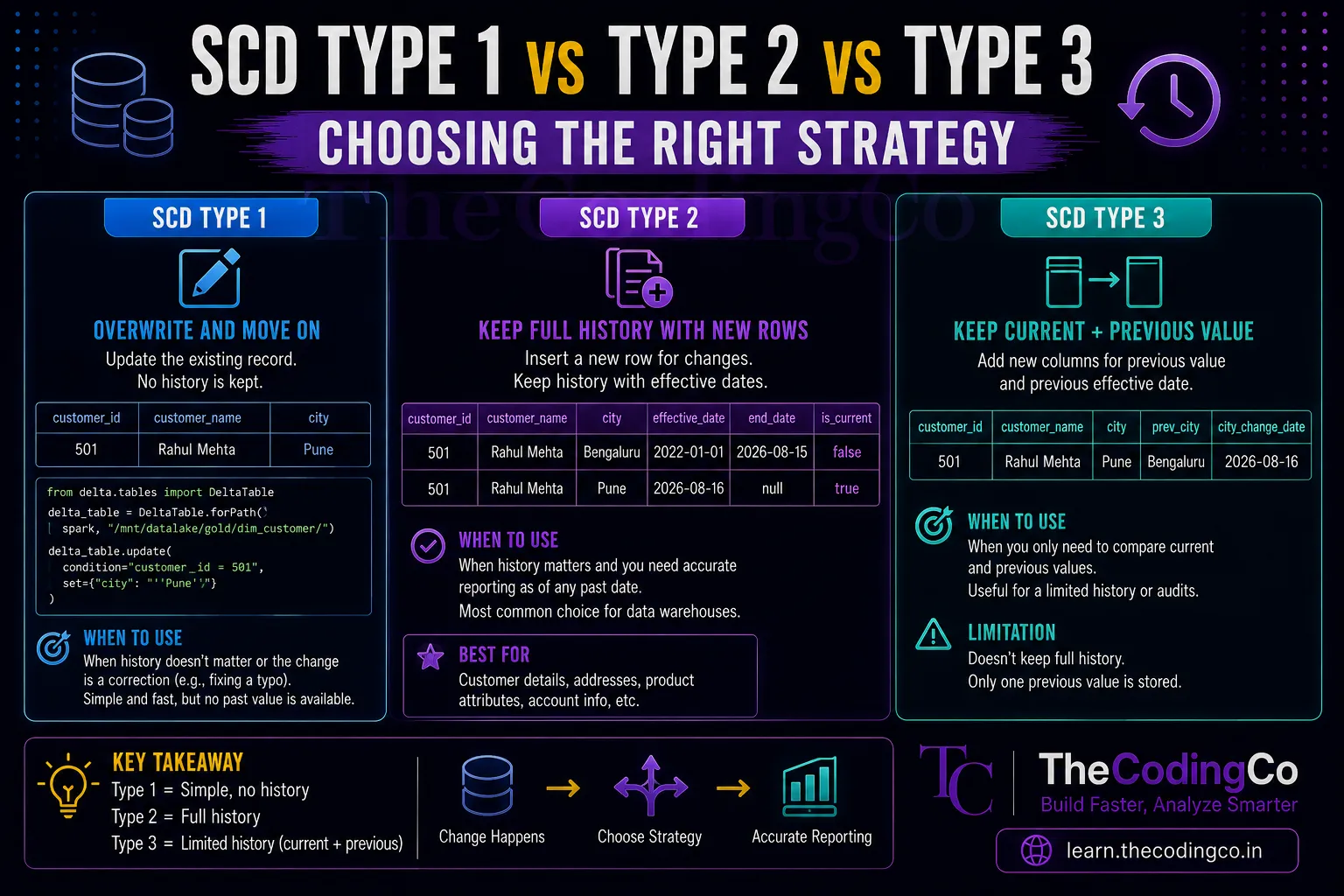
Since we do not need to preserve history here, just always show the current correct value, SCD Type 1 is the right approach.
Step 1, look at the existing target table
Assume our Dim_Customer Delta table already exists in the Gold layer, structured like this.
existing_data = [
    (501, "Rahul Mehta", "Bengaluru", "9876543210"),
    (502, "Anita Sharma", "Pune", "9123456780"),
    (503, "Karan Verma", "Hyderabad", "9988776655")
]

columns = ["customer_id", "customer_name", "city", "phone"]

df_existing = spark.createDataFrame(existing_data, columns)

df_existing.write.format("delta") \
    .mode("overwrite") \
    .save("/mnt/datalake/gold/dim_customer/")
This is our starting state, three customers, sitting in Azure Data Lake Storage Gen2 as a Delta table.
Step 2, bring in the incoming updates
Now say today's source file arrives with the following data. Rahul moved to Pune. Anita's phone number was corrected. And there is a brand new customer, Priya, who was never in our table before.
incoming_data = [
    (501, "Rahul Mehta", "Pune", "9876543210"),
    (502, "Anita Sharma", "Pune", "9123456799"),
    (504, "Priya Nair", "Chennai", "9012345678")
]

df_incoming = spark.createDataFrame(incoming_data, columns)
Notice customer 503, Karan, is not in this incoming batch at all, since nothing changed for him today. This is a realistic situation, since source systems often only send changed or new records, not a full dump every time.
Step 3, write the MERGE logic
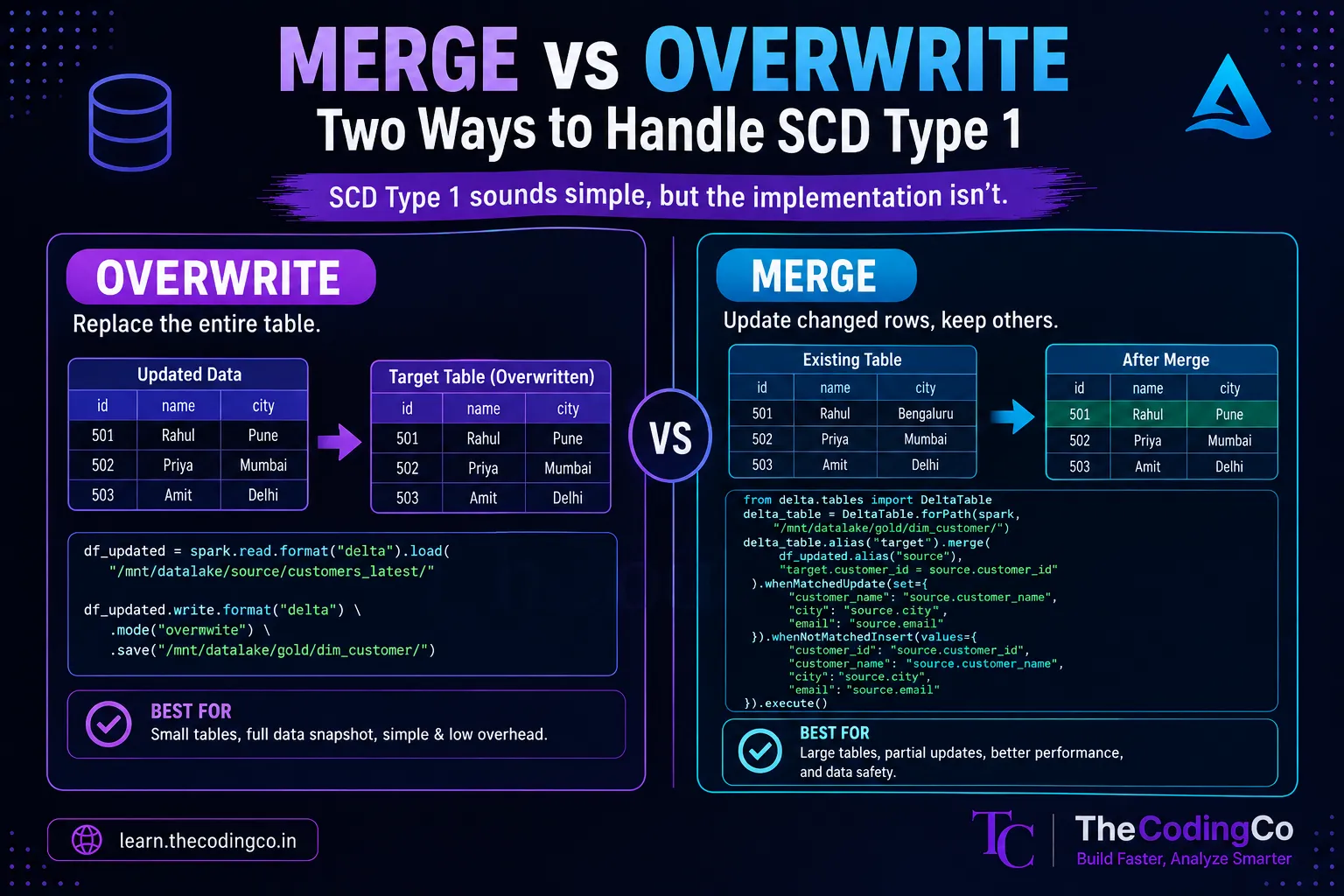
This is where the actual SCD Type 1 logic happens. We compare df_incoming against the existing Delta table, updating any matching customer with new values, and inserting any customer that does not already exist.
from delta.tables import DeltaTable

delta_table = DeltaTable.forPath(spark, "/mnt/datalake/gold/dim_customer/")

delta_table.alias("target").merge(
    df_incoming.alias("source"),
    "target.customer_id = source.customer_id"
).whenMatchedUpdate(set={
    "customer_name": "source.customer_name",
    "city": "source.city",
    "phone": "source.phone"
}).whenNotMatchedInsert(values={
    "customer_id": "source.customer_id",
    "customer_name": "source.customer_name",
    "city": "source.city",
    "phone": "source.phone"
}).execute()
Step 4, checking the result
After running this, querying the table should show exactly what we expect.
spark.read.format("delta") \
    .load("/mnt/datalake/gold/dim_customer/") \
    .orderBy("customer_id") \
    .show()
| customer_id | customer_name | city | phone |
|---|---|---|---|
| 501 | Rahul Mehta | Pune | 9876543210 |
| 502 | Anita Sharma | Pune | 9123456799 |
| 503 | Karan Verma | Hyderabad | 9988776655 |
| 504 | Priya Nair | Chennai | 9012345678 |
Rahul's city updated to Pune. Anita's phone number updated. Karan stayed completely untouched since he was not in the incoming batch. And Priya got inserted as a brand new row. No history of Rahul's old Bengaluru value exists anywhere, which is exactly the expected behavior for Type 1.
Handling only the columns that actually changed
One improvement worth making to this pattern is only triggering an update when something has genuinely changed, rather than running an update statement even when the incoming values are identical to what already exists. This avoids unnecessary writes and keeps the Delta transaction log cleaner.
delta_table.alias("target").merge(
    df_incoming.alias("source"),
    "target.customer_id = source.customer_id"
).whenMatchedUpdate(
    condition="""
        target.customer_name <> source.customer_name OR
        target.city <> source.city OR
        target.phone <> source.phone
    """,
    set={
        "customer_name": "source.customer_name",
        "city": "source.city",
        "phone": "source.phone"
    }
).whenNotMatchedInsert(values={
    "customer_id": "source.customer_id",
    "customer_name": "source.customer_name",
    "city": "source.city",
    "phone": "source.phone"
}).execute()
This small addition means a customer whose data has not actually changed does not get rewritten unnecessarily every time this pipeline runs, which matters more as the table and the frequency of runs both grow.
Handling nulls carefully
A detail that catches people off guard is what happens when an incoming record has a null value for a field that already has data. Depending on the source system, a null might mean "this field genuinely has no value," or it might mean "this field was simply not included in today's update," which are very different things.
delta_table.alias("target").merge(
    df_incoming.alias("source"),
    "target.customer_id = source.customer_id"
).whenMatchedUpdate(set={
    "customer_name": "COALESCE(source.customer_name, target.customer_name)",
    "city": "COALESCE(source.city, target.city)",
    "phone": "COALESCE(source.phone, target.phone)"
}).whenNotMatchedInsert(values={
    "customer_id": "source.customer_id",
    "customer_name": "source.customer_name",
    "city": "source.city",
    "phone": "source.phone"
}).execute()
Using COALESCE here means if the incoming value is null, the existing value is preserved instead of being overwritten with null. Whether this is the correct behavior depends entirely on what a null actually represents in your specific source system, so this is worth confirming rather than assuming.
A quick note on performance for larger tables
For a small demo table like this one, performance is a non issue. But if Dim_Customer had ten million rows, it becomes worth applying Z-Ordering on customer_id, since that is the column being used in the merge condition, to help Delta Lake locate matching rows faster during the comparison.
spark.sql("OPTIMIZE delta.`/mnt/datalake/gold/dim_customer/` ZORDER BY (customer_id)")
Running this periodically on a large, frequently merged table can noticeably improve merge performance over time.
Interview angle
If asked to walk through implementing SCD Type 1, being able to explain the MERGE logic clearly, specifically the whenMatchedUpdate and whenNotMatchedInsert clauses, and why you would want a change condition rather than unconditionally updating every matched row, shows practical hands on understanding rather than just theoretical knowledge of what SCD Type 1 means.
Quick recap
Implementing SCD Type 1 in PySpark and Delta Lake comes down to a MERGE statement that updates matching records with their latest values and inserts any genuinely new records, without preserving any history. Adding a change condition to the update clause avoids unnecessary rewrites when nothing actually changed, using COALESCE handles cases where incoming nulls should not overwrite existing valid data, and applying Z-Ordering on the join key helps performance once the table grows large.