PySpark for Data Engineers, Complete Roadmap from Basics to Advanced
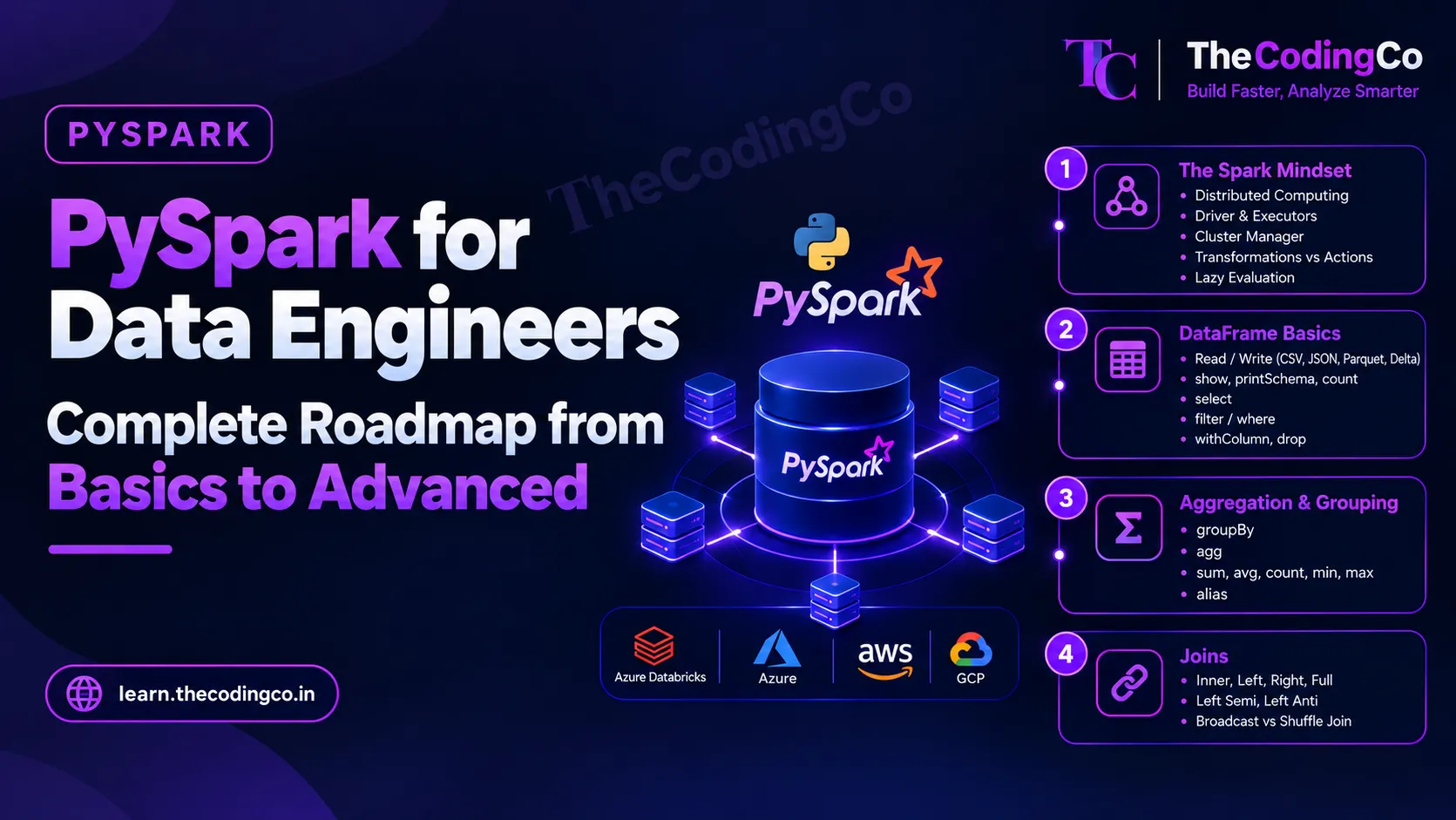
A proper syllabus for PySpark specifically from a data engineering angle, covering exactly what to learn, in what order, and where each piece actually shows up in real pipeline work on Azure Databricks and beyond.
Why PySpark needs its own dedicated roadmap
SQL and Python get you comfortable thinking about data and writing logic, but neither one actually teaches you to think in distributed terms, meaning your data and your computation are spread across many machines instead of sitting on one. That shift in thinking is genuinely the whole point of learning PySpark properly, rather than just memorizing DataFrame syntax that happens to look similar to pandas.
This roadmap assumes you already have a reasonably solid SQL foundation and working Python skills, since PySpark leans heavily on both. Each stage below tells you what to learn and where it actually shows up in real pipeline work, and ends with a quick reference list of the exact functions and concepts covered, so if you already know a topic, you can glance at it and move ahead.
A quick note on background. Most of this is written with Azure Databricks in mind, since that is the most common real world environment for PySpark work on Azure, but the actual Spark concepts here are identical whether you eventually work on AWS EMR, GCP Dataproc, or plain open source Spark. I have called out where your existing background genuinely helps along the way.
Stage 1: Understanding Why Spark Exists Before Touching Any Code
Before writing a single line of PySpark, get the mental model right, since skipping this is exactly why a lot of people can write DataFrame code that runs, but cannot explain why it is slow or how to fix it.
Understand the basic idea of distributed computing, splitting both data and computation across many machines instead of relying on one machine's memory and processing power. Learn the roles of the driver, the process that coordinates everything and builds the actual execution plan, and the executors, the worker processes that actually carry out the work on their own slice of data, along with a basic idea of what a cluster manager does in assigning resources.
Learn the difference between a transformation and an action. A transformation, like a filter or a select, does not actually run anything immediately, Spark just builds up a plan. An action, like show, count, or write, is what actually triggers Spark to execute that plan. This laziness is not just a technical detail, it is exactly why Spark can optimize a whole chain of operations together instead of running each one immediately and separately. Real scenario, chaining several filters and a select together costs nothing until you finally call an action, at which point Spark figures out the most efficient way to do all of it together.
Quick reference, stage one
- distributed computing, data and computation split across machines
- driver and executors
- cluster manager, basic idea
- transformations versus actions
- lazy evaluation
Stage 2: DataFrame Basics
Once the mental model is clear, DataFrame syntax itself will feel very approachable, especially with a solid SQL background behind you.
Learn to create a DataFrame from various sources, and specifically learn to read and write the file formats you will actually encounter, CSV, JSON, Parquet, and Delta, understanding that Parquet is a columnar format that most real Bronze and Silver layer data eventually lives in, while Delta builds on top of Parquet with added reliability features. Learn to inspect a DataFrame properly, show for viewing rows, printSchema for seeing column names and types, and count for row counts.
Learn select for picking specific columns, filter or where, both do the same thing, for keeping only matching rows, withColumn for adding or modifying a column, and drop for removing one. Real scenario, reading raw Bronze layer data, immediately checking its schema to confirm column types came through as expected, then selecting only the relevant columns before any further cleaning happens.
Quick reference, stage two
- reading and writing CSV, JSON, Parquet, and Delta
- show, printSchema, count
- select
- filter and where
- withColumn
- drop
Stage 3: Aggregation and Grouping in PySpark
groupBy combined with agg is where PySpark starts answering the same kind of business questions SQL does, just at distributed scale. Learn the common aggregate functions, sum, avg, count, min, and max, and how to apply several of them together inside a single agg call, along with using alias to give the resulting columns clean, readable names instead of Spark's default generated names.
Real scenario, building a Gold layer summary table showing total sales and average order value per store per day, which is almost always a groupBy followed by a multi function agg call in real Databricks pipelines.
Quick reference, stage three
- groupBy
- agg
- sum, avg, count, min, max
- alias for renaming aggregated columns
Stage 4: JOINs, And Why This Deserves A Full Separate Read
Joins in PySpark cover the same conceptual ground as SQL joins, inner, left, right, full, semi, and anti, but with some genuinely important distributed specific behavior layered on top, particularly around shuffles and broadcast joins.
Since this topic is big enough to deserve its own full explanation with execution plans and worked examples, it is covered as a dedicated post, see the full Joins in PySpark post for every join type walked through against the same sample data, and the Broadcast Join versus Shuffle Join post specifically for understanding when Spark moves data across the network during a join and how to avoid that cost when one side is small enough to broadcast. Real scenario, joining a large fact table against small dimension tables is exactly the situation where broadcasting the small side avoids an expensive shuffle on the large side entirely.
Quick reference, stage four
- inner, left, right, and full outer joins
- left semi and left anti joins
- broadcast join versus shuffle join
- see the dedicated Joins in PySpark and Broadcast Join posts for full depth
Stage 5: Window Functions In PySpark
Just like in SQL, window functions are genuinely one of the most important tools here, and they translate almost directly from the SQL concepts you already know.
Learn to define a Window spec using partitionBy and orderBy, then apply row_number, rank, and dense_rank over it. Real scenario, row_number partitioned by a natural key and ordered by a timestamp is exactly the standard pattern for deduplicating incoming records, keeping only the row where row_number equals one, which shows up constantly in real Silver layer cleaning jobs.
Learn lag and lead for comparing a row against the previous or next row within a partition, real scenario being comparing a customer's current transaction against their previous one directly. Learn running totals and moving aggregations using sum or avg over a Window with a defined row range, real scenario being a running total of sales per store through a month, calculated entirely inside PySpark rather than needing a separate step.
Quick reference, stage five
- Window, partitionBy, orderBy
- row_number, rank, dense_rank
- lag and lead
- running totals and moving aggregations over a Window
Stage 6: Handling NULLs And Cleaning Data Properly
Real data is messy, and PySpark gives you specific, deliberate tools for handling that rather than letting it silently break downstream logic.
Learn isNull and isNotNull for checking null values directly, and fillna and dropna for filling in default values or removing rows with nulls, understanding that fillna can take a dictionary to apply different default values to different columns at once. Learn when combined with otherwise as PySpark's equivalent to a CASE WHEN statement in SQL, real scenario being standardizing a messy status column with inconsistent values into one clean value using a chain of when conditions.
Learn dropDuplicates specifically, and understand the difference between removing exact duplicate rows entirely versus using a window function based row_number approach when you specifically need to keep the most recent version of a duplicated record rather than an arbitrary one.
Quick reference, stage six
- isNull and isNotNull
- fillna and dropna
- when and otherwise
- dropDuplicates versus row_number based deduplication
Stage 7: User Defined Functions, And Knowing When Not To Use Them
Learn how to write a basic UDF, a user defined function, for logic that PySpark's built in functions genuinely cannot express directly. Just as important as knowing how to write one is understanding their real cost, a standard Python UDF forces Spark to serialize data out of its optimized internal format, run your Python code row by row, and serialize the result back, which is genuinely slow compared to using Spark's built in functions whenever an equivalent one exists.
Real scenario, if a transformation can be expressed using built in functions like when, regexp_extract, or date functions, that is almost always the better choice over writing a custom UDF for the same logic. Where a UDF genuinely is necessary, learn about pandas UDFs, which operate on batches of data using pandas underneath rather than row by row, offering meaningfully better performance for cases where a plain UDF is unavoidable.
Quick reference, stage seven
- writing a basic UDF
- performance cost of row by row UDF execution
- preferring built in functions over UDFs where possible
- pandas UDFs for batch based performance
Stage 8: Spark SQL, Writing SQL Directly Against DataFrames
Learn to register a DataFrame as a temporary view using createOrReplaceTempView, and then query it directly using spark.sql, writing genuine SQL syntax against it. This matters for two real reasons, first, some transformations are genuinely easier to express in plain SQL, especially complex multi join logic, and second, a lot of real teams have colleagues who are stronger in SQL than in the PySpark DataFrame API, and Spark SQL lets everyone work against the same data using whichever style is clearer for the task at hand.
Real scenario, registering a cleaned Silver layer DataFrame as a temp view and writing the final Gold layer aggregation entirely in SQL, since a complex multi table join with several aggregations can sometimes read more clearly as SQL than as a long chain of DataFrame method calls.
Quick reference, stage eight
- createOrReplaceTempView
- spark.sql for querying DataFrames using SQL
- choosing between DataFrame syntax and SQL syntax based on clarity
Stage 9: Performance and Optimization, Where Real Depth Shows
This is genuinely the stage that separates someone who can write correct PySpark code from someone who can write PySpark code that performs well at real data volumes, and it is exactly what gets tested in more experienced interviews.
Learn repartition and coalesce, both control how many partitions your data is split into, but repartition can increase or decrease partitions and involves a full shuffle, while coalesce only decreases partitions and avoids a full shuffle where possible, making it the better choice specifically when reducing partition count before a final write. Learn cache and persist for keeping a DataFrame in memory across multiple actions when it is being reused repeatedly, real scenario being caching a cleaned DataFrame that gets joined against several different dimension tables afterward, rather than recomputing it from scratch each time.
Learn to read a basic explain plan, recognizing a shuffle, an Exchange step in the plan, and understanding that shuffles are expensive because they move data across the network between machines. Learn the basic idea of data skew, when one partition ends up with dramatically more data than others because of an uneven key distribution, and why that specific partition then becomes the bottleneck for the entire job. Learn about Adaptive Query Execution as well, a feature that lets Spark adjust its execution plan partway through a job based on actual runtime statistics, which has made some of these performance problems, though not all of them, meaningfully less painful in recent Spark versions.
Quick reference, stage nine
- repartition versus coalesce
- cache and persist
- reading an explain plan and recognizing a shuffle
- data skew
- Adaptive Query Execution
Stage 10: Delta Lake, Since Almost All Real Databricks Work Runs On It
Learn what Delta Lake actually adds on top of plain Parquet, ACID transactions, meaning a write either fully succeeds or fully fails rather than leaving data in a half written state, and a proper transaction log that tracks every change made to a table over time.
Learn MERGE INTO thoroughly, since this is exactly how real incremental loads and slowly changing dimensions get implemented in production, matching incoming records against an existing table and deciding row by row whether to insert or update, the same underlying idea as SQL MERGE, just expressed as MERGE INTO in Delta syntax. Learn time travel, querying a Delta table as it existed at a previous version or timestamp, real scenario being investigating exactly what a table looked like before a bad pipeline run corrupted it.
Learn schema evolution, allowing a table's schema to grow as new columns arrive from a source system, along with OPTIMIZE for compacting many small files into fewer larger ones, which genuinely improves read performance over time, and VACUUM for cleaning up old file versions that are no longer needed, along with Z ordering for improving read performance on columns that are frequently filtered on.
Quick reference, stage ten
- ACID transactions and the Delta transaction log
- MERGE INTO
- time travel
- schema evolution
- OPTIMIZE and file compaction
- VACUUM
- Z ordering
Stage 11: Structured Streaming, At A Working Level
You do not need deep streaming expertise for most data engineering roles, but a working understanding genuinely helps, since near real time pipelines are becoming more common.
Learn the basic idea of readStream and writeStream, treating an incoming stream of data as an unbounded, continuously growing table rather than something fundamentally different from batch processing, since this is exactly how Spark's structured streaming model is designed. Learn triggers, controlling how often a streaming job processes new data, and checkpointing, which lets a streaming job resume correctly from where it left off if it restarts. Learn the basic idea of watermarking too, which tells Spark how long to wait for late arriving data before considering a time window complete, real scenario being handling events that arrive a few minutes late from an unreliable network without either waiting forever or losing that late data entirely.
Quick reference, stage eleven
- readStream and writeStream
- triggers
- checkpointing
- watermarking for late arriving data
Stage 12: The Databricks Environment Specifically
Since a large share of real PySpark work happens inside Azure Databricks specifically, learn the platform itself, not just the Spark code. Learn how notebooks are organized, how clusters are configured, and the basic difference between an all purpose cluster used for development and a job cluster spun up specifically to run a scheduled pipeline. Learn Databricks Workflows for orchestrating multiple notebooks or jobs together with dependencies between them.
Learn dbutils, specifically for working with secrets stored securely rather than hard coded credentials, and for basic file system operations within Databricks. If your environment uses Unity Catalog, learn its basic role in managing data governance and access control centrally across an organization's Databricks workspaces, since this has become an increasingly standard part of real enterprise Databricks environments.
Quick reference, stage twelve
- notebooks and cluster configuration
- all purpose clusters versus job clusters
- Databricks Workflows
- dbutils and secrets
- basic Unity Catalog awareness
Stage 13: Writing PySpark Code That Is Actually Production Ready
A few habits genuinely separate a notebook full of working cells from real production pipeline code. Learn to modularize your logic into proper functions across organized files rather than one long notebook, making it testable and reusable. Learn to drive your pipeline through configuration, file paths, table names, and thresholds read from a config file or parameters, rather than hard coded directly into the code, since this is exactly what lets the same pipeline run across development, test, and production environments without changes to the code itself.
Learn to add proper logging throughout a pipeline, recording what was processed, how many rows, and any records that were skipped or flagged, and get a working sense of how to write basic tests for your transformation logic, checking that a function produces the expected output against a small sample DataFrame, which is genuinely valuable even without full test coverage of an entire pipeline.
Quick reference, stage thirteen
- modularizing PySpark logic into functions and files
- configuration driven pipelines instead of hard coded values
- proper logging throughout a pipeline
- basic testing of transformation logic
A note if you are coming from a different background
If you are coming from a pure pandas background with no distributed processing experience, the DataFrame syntax will feel familiar quickly, but genuinely slow down at stage one and stage nine, since understanding laziness, shuffles, and partitioning is exactly the part pandas never required you to think about, and skipping it is where a lot of pandas developers struggle later with PySpark performance.
If you are coming from a Hadoop or Hive background, you already understand distributed thinking and the idea of data sitting across many machines, and your real adjustment is mainly syntax and getting comfortable with Spark's DataFrame API and lazy execution model instead of Hive's more SQL only approach.
If you are coming from AWS EMR or GCP Dataproc rather than Azure Databricks, the underlying Spark concepts here are identical, the difference is mainly the surrounding platform, cluster management, notebook environment, and how secrets and orchestration are handled, rather than anything about PySpark itself.
How to actually practice this instead of just reading it
Pick one dataset, build it out through a full Bronze, Silver, Gold pipeline inside Databricks, deliberately including at least one deduplication step using row_number, one broadcast join against a small dimension table, one MERGE INTO for an incremental load, and one aggregation using a Window function for a running total. Building this single, connected pipeline properly teaches you more than practicing each PySpark function in isolation, since real interview questions and real job requirements are almost always framed as a connected scenario rather than a standalone syntax question.
Interview angle
If asked about PySpark experience, always be ready to explain a real transformation scenario end to end rather than listing function names. Saying something like, I used row_number partitioned by a natural key to deduplicate incoming records, then used a broadcast join to enrich the data against a small dimension table without a full shuffle, and finally used MERGE INTO to load the result incrementally into a Delta table, demonstrates real, connected understanding far more clearly than naming individual functions. Being able to explain why a broadcast join or a well chosen partition strategy actually improves performance, not just that it does, is consistently one of the strongest signals in a data engineering interview.
Quick recap
Start by genuinely understanding why Spark exists, distributed computing, the driver and executor model, and lazy evaluation through transformations and actions, before touching a single line of DataFrame code. Build DataFrame fundamentals, aggregation, and every join type, with dedicated depth on broadcast joins, then move into window functions, which translate almost directly from SQL and show up constantly in real cleaning and deduplication work. Learn to handle nulls and messy data properly, understand when a UDF is genuinely needed versus when a built in function is the better choice, and get comfortable moving between DataFrame syntax and Spark SQL depending on what reads more clearly. Go deep on performance, partitioning, caching, shuffles, and data skew, since this is what real experience actually looks like, and learn Delta Lake thoroughly, especially MERGE INTO, since it underlies most real incremental loading patterns. Round it out with at least a working understanding of structured streaming, the Databricks platform itself, and the habits that make pipeline code genuinely production ready rather than notebook code that merely runs once successfully.