Python for Data Engineers, Complete Roadmap from Basics to Advanced
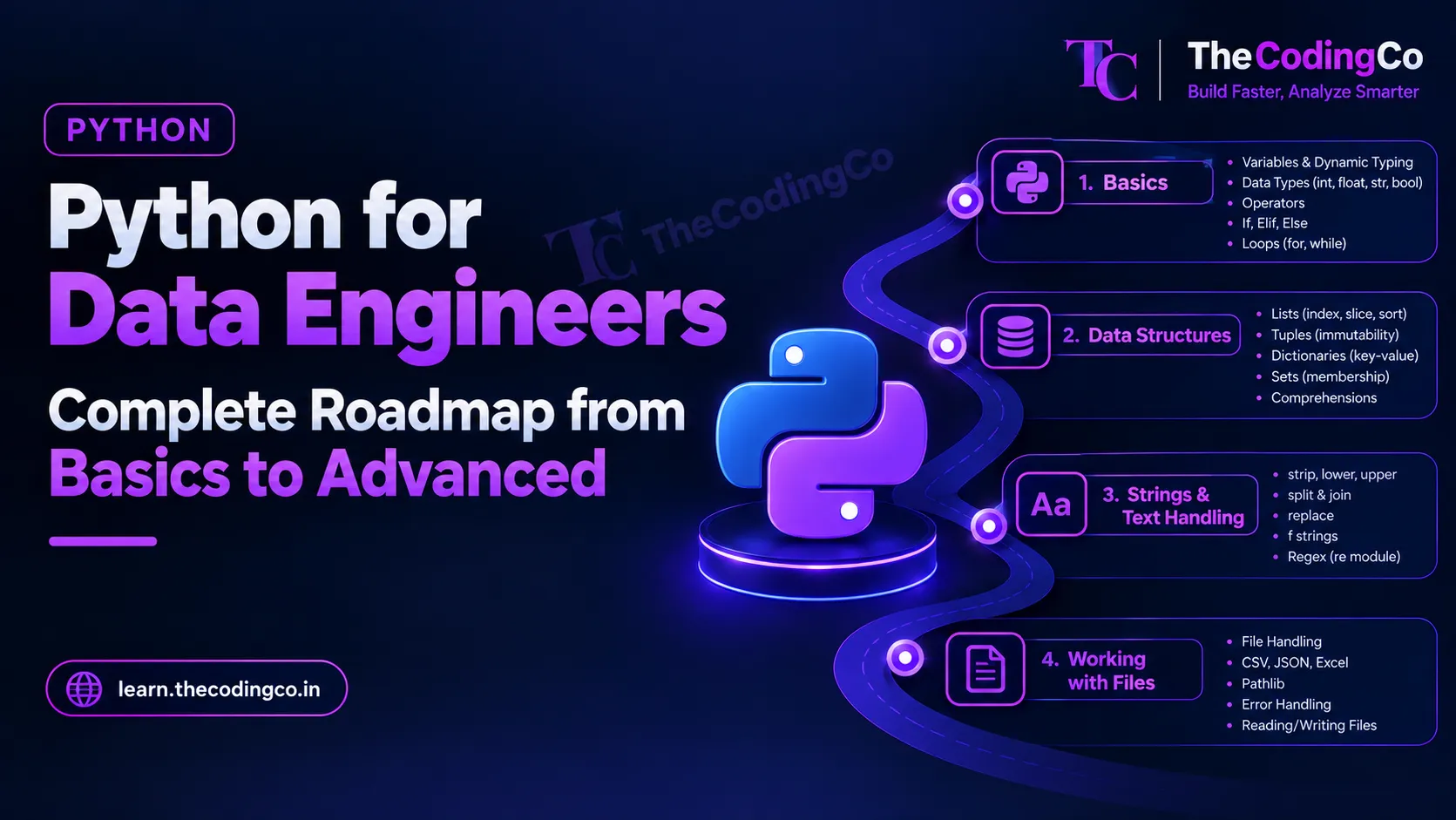
A proper syllabus for Python specifically from a data engineering angle, covering exactly what to learn, in what order, and where each piece actually shows up in real pipeline work, not just generic programming syntax.
Why this Python roadmap looks a little different
A lot of Python content out there is written either for someone building web applications, or for someone doing pure data science with machine learning as the end goal. Data engineering Python sits in its own space, in between. You are not building user interfaces, and you are usually not training models either. You are writing code that reads data, validates it, transforms it, handles failures properly, and moves it somewhere else, often as one piece inside a larger pipeline built on top of Azure Data Factory, Databricks, or similar tools.
This roadmap is written specifically around that reality. Each stage tells you what to learn and, just as importantly, where you would actually use it in real pipeline work, so it sticks rather than feeling like disconnected syntax. Each stage also ends with a quick reference list of the exact concepts covered, so if you already know a topic, you can glance at it and move ahead.
A quick note on background. Everything here is written assuming you might be coming from very different starting points, a complete beginner, someone with SQL experience but no programming background, or someone switching from another programming language like Java, C sharp, or Scala. I have called out where your existing experience genuinely helps along the way.
Stage 1: The Real Fundamentals
Start with the basics properly, even if some of this feels familiar. Variables, the core data types, integers, floats, strings, booleans, and how Python handles typing dynamically compared to a language like Java or C sharp, where you would normally declare a type explicitly. Learn operators, arithmetic, comparison, and logical operators, and how conditions are written using if, elif, and else.
Then move into loops, for loops and while loops, and specifically get comfortable with how Python iterates directly over a list or a dictionary rather than relying purely on index based looping the way some other languages encourage. Real scenario, looping through a list of file names in a folder to check which ones match an expected naming pattern before processing them.
If you are coming from a language like Java or C sharp, most of this stage will move quickly for you, the main adjustment is getting used to Python's indentation based blocks instead of curly braces, and its more relaxed approach to typing.
Quick reference, stage one
- variables and dynamic typing
- integers, floats, strings, booleans
- arithmetic, comparison, and logical operators
- if, elif, else
- for loops and while loops
- iterating directly over lists and dictionaries
Stage 2: Data Structures, Properly
Lists, tuples, dictionaries, and sets are the actual backbone of everyday Python code in data engineering work, so this stage deserves real time rather than a quick pass.
Learn lists thoroughly, indexing, slicing, appending, and sorting. Learn tuples specifically for immutable groupings of values, real scenario being returning a fixed pair of values from a function, like a status and a message, without needing a full class. Dictionaries deserve serious focus, since they map extremely naturally onto real data, one dictionary per record is basically how a single row of data looks before it is loaded into a proper DataFrame or table. Sets matter specifically for fast membership checks and removing duplicates, real scenario being quickly checking whether an incoming customer_id already exists in a set of known valid IDs, without scanning a full list every time.
List comprehensions and dictionary comprehensions are worth learning properly here too, since they let you write a transformation in one clean line instead of a multi line loop, and they show up constantly in real code, real scenario being filtering out invalid records and reshaping the remaining ones from a raw list of dictionaries in a single comprehension.
Quick reference, stage two
- lists, indexing, slicing, sorting
- tuples and immutability
- dictionaries and key value access
- sets and membership checks
- list comprehensions
- dictionary comprehensions
Stage 3: Strings And Basic Text Handling
String methods come up constantly when cleaning data, strip for removing extra whitespace, lower and upper for standardizing casing, split and join for breaking apart and rebuilding delimited text, and replace for basic substitutions. Real scenario, cleaning a messy status column where the same value shows up as active, ACTIVE, and " Active " with stray spaces, before it goes anywhere near a table.
Learn f strings properly for readable string formatting, since they are genuinely the standard way modern Python code builds dynamic strings, whether that is a log message or a dynamically constructed file path.
Basic regular expressions using the re module are worth knowing at a working level, not necessarily mastering every possible pattern, but enough to validate a format, like checking whether a string matches an expected date pattern, or extracting a specific piece of text out of a larger string, real scenario being pulling a date out of a file name before deciding where that file should be processed.
Quick reference, stage three
- strip, lower, upper
- split and join
- replace
- f strings
- basic regular expressions with re
Stage 4: Working With Files Properly
This stage is genuinely central to data engineering work, especially before data lands inside Spark or a warehouse table.
Learn how to read and write plain text files using open, and specifically learn to use the with statement, a context manager, which properly closes a file automatically even if something goes wrong partway through, rather than relying on you to remember to close it manually. Real scenario, this matters constantly when a script processes a large file and an error partway through would otherwise leave the file handle open.
Learn to work with CSV files using the csv module, and JSON files using the json module, since these two formats show up constantly as the shape raw data actually arrives in from source systems and APIs. Understand the difference between reading a file as plain text versus parsing it into an actual structured object, a list of dictionaries for CSV, a dictionary or list for JSON, since that structured version is what you will actually transform in code.
Quick reference, stage four
- open and file handling
- with statement, context managers
- reading and writing CSV using the csv module
- reading and writing JSON using the json module
Stage 5: Exception Handling, done Properly
A huge number of beginners either skip this entirely or wrap everything in a single broad except block that hides real problems instead of handling them. Learn try, except, else, and finally properly, understanding that except should generally catch a specific, expected error, like a missing file or an invalid value, rather than every possible error blindly.
Real scenario, wrapping a section that reads an incoming file specifically to catch a FileNotFoundError with a clear message, rather than letting the entire pipeline crash with a confusing generic error further down the line. Learn to raise exceptions deliberately too, when your own code detects an invalid situation, real scenario being raising a clear error when an incoming record is missing a required field, rather than silently letting a bad record continue further into the pipeline.
Alongside this, learn basic logging using the logging module instead of scattering print statements everywhere. Real scenario, using logging to record exactly which file was being processed and what went wrong, in a way that is still visible after the script has finished running, which a print statement in a terminal simply does not give you.
Quick reference, stage five
- try, except, else, finally
- catching specific exceptions rather than a broad except
- raising exceptions deliberately
- the logging module instead of print statements
Stage 6: Functions, Properly, Not Just The Basics
Functions deserve a dedicated stage here since well written functions are genuinely what separates a working script from maintainable pipeline code.
Learn default arguments, args and kwargs for flexible function signatures, and returning multiple values from a single function. Learn lambda functions, small unnamed functions used inline, real scenario being a quick sorting key passed directly into a sort call without needing a fully defined function elsewhere. Learn map and filter as well, understanding that in a lot of real modern code a list comprehension is often clearer than map or filter, but you will still see both in existing codebases, so recognizing them matters.
Get a working understanding of decorators too, functions that wrap other functions to add behavior without changing their actual logic. Real scenario, a simple timing decorator that logs how long a transformation function took to run, which is a genuinely common pattern in real pipeline code for basic performance visibility.
Quick reference, stage six
- default arguments, args, and kwargs
- returning multiple values
- lambda functions
- map and filter
- decorators
Stage 7: Object Oriented Basics, Just Enough To Be Useful
You do not need to become a deep object oriented design expert for this field, but a working understanding of classes genuinely helps once your code grows beyond a handful of functions in one file.
Learn how to define a class, create an object from it, and understand the basic idea of methods and attributes belonging to that object. Learn the very basics of inheritance, one class extending another, real scenario being a base class representing a generic data source connection, with specific classes for a SQL source and an API source each extending it with their own specific connection logic, while sharing common behavior from the base class.
You genuinely do not need to go much deeper than this early on, concepts like multiple inheritance or deep design patterns can wait until you have a real reason to reach for them.
Quick reference, stage seven
- defining a class and creating objects
- methods and attributes
- basic inheritance
Stage 8: Modules, Packages, and Project Structure
Learn how imports actually work in Python, importing a whole module, importing specific functions from a module, and understanding roughly how Python looks for a module when you import it. Learn virtual environments properly, since running every project inside its own isolated environment, rather than installing everything globally, is a genuinely important habit that avoids version conflicts between different projects. Learn pip for installing packages, and get comfortable with a requirements file that lists exact package versions, since this is exactly what lets someone else, or a deployment pipeline, recreate your environment reliably.
Also learn the basics of organizing a real project into multiple files and folders sensibly, rather than everything living in one enormous script, real scenario being separating your file reading logic, your transformation logic, and your logging setup into distinct, clearly named files that a real production project would actually be structured around.
Quick reference, stage eight
- import statements and module lookup
- virtual environments
- pip and package installation
- requirements file for reproducible environments
- organizing code across multiple files
Stage 9: Working With APIs
A meaningful share of real data engineering ingestion work involves pulling data from an API rather than a database, so this deserves dedicated attention.
Learn the requests library, making a basic GET request, understanding status codes, and parsing a JSON response back into a Python dictionary or list. Learn how authentication typically works at a basic level, passing an API key or a token in the request headers, since almost no real API you will work with is fully open. Learn pagination handling too, real scenario being an API that only returns a hundred records per call, requiring your code to loop through multiple pages until every record has actually been pulled, rather than assuming one call returns everything.
Also get comfortable handling a failed request gracefully, checking the status code and retrying or logging a clear failure, rather than assuming every API call will succeed every time, since in real pipelines, it genuinely will not.
Quick reference, stage nine
- the requests library and GET requests
- status codes
- parsing JSON responses
- authentication using headers, API keys, and tokens
- handling pagination
- retry and failure handling for API calls
Stage 10: Connecting Python to Databases
Learn how to connect Python to a relational database, using pyodbc or SQLAlchemy for SQL Server, or the equivalent connector for MySQL, PostgreSQL, or Oracle if that is your environment. Learn how to execute a query from Python and pull the results back into a usable structure, real scenario being running a query against a source system on a schedule and loading the results directly into a pandas DataFrame for further processing.
This stage also matters specifically for learning parameterized queries properly, passing values into a query safely rather than directly building a query string by joining text together, since the second approach is exactly how SQL injection vulnerabilities happen, and it is a genuinely important habit to build correctly from the start rather than fixing later.
Quick reference, stage ten
- connecting to SQL Server using pyodbc or SQLAlchemy
- equivalent connectors for MySQL, PostgreSQL, and Oracle
- executing queries from Python
- parameterized queries versus building query strings manually
Stage 11: Pandas, the Actual Workhorse For Smaller Scale Data Work
Even in a heavily Spark based environment, pandas still shows up constantly for smaller datasets, quick validation, and local testing before scaling logic up into PySpark.
Learn to read and write CSV, JSON, and Excel files directly into a DataFrame. Learn filtering rows, selecting specific columns, and sorting, all of which will feel familiar if your SQL foundation is solid, since pandas mirrors a lot of SQL thinking. Learn groupby for aggregation, real scenario being quickly summarizing total sales by region for a one off business question without needing to spin up a full Spark job for a small file.
Learn merge for joining two DataFrames together, and specifically learn how pandas handles missing values, isna, fillna, and dropna, since handling missing data properly is a constant, real part of cleaning work. Learn apply as well, for applying a custom function across rows or columns, real scenario being applying a cleaning function to standardize a messy column that a built in method alone cannot handle.
Quick reference, stage eleven
- reading and writing CSV, JSON, and Excel with pandas
- filtering, selecting columns, sorting
- groupby for aggregation
- merge for joining DataFrames
- isna, fillna, dropna for missing values
- apply for custom row or column logic
Stage 12: Automation And Real Script Habits
Learn argparse for accepting command line arguments into a script, real scenario being a script that processes a specific date's worth of data, where that date is passed in as an argument rather than hard coded, letting the same script be reused for any date, including being triggered from an orchestration tool like Azure Data Factory or Airflow.
Learn to work with environment variables and configuration files rather than hard coding things like connection strings, file paths, or API keys directly into your script, since hard coded values are exactly the kind of thing that causes real problems when code moves from a development environment into production. Learn the basic idea of how a scheduled or triggered script fits into a broader pipeline, being called by an orchestration tool rather than being run manually every time.
Quick reference, stage twelve
- argparse and command line arguments
- environment variables
- configuration files instead of hard coded values
- scripts designed to be triggered by an orchestration tool
Stage 13: Basic Testing
Learn the basics of writing a unit test using pytest, specifically testing a single function's behavior with a known input and an expected output. Real scenario, testing a cleaning function that standardizes a status column, checking that it correctly handles a normal value, an unexpected value, and a missing value, all in isolated, repeatable tests rather than manually checking by eye every time you make a change.
You do not need deep testing expertise immediately, but being able to write a few meaningful tests for your own transformation logic is genuinely a strong signal of maturity as a developer, and it comes up more in interviews for experienced roles than most people expect.
Quick reference, stage thirteen
- pytest basics
- testing a function with expected inputs and outputs
- testing edge cases like missing or unexpected values
Stage 14: Performance Habits And Cleaner Code
A few habits genuinely separate polished, production ready Python from code that merely works. Avoid looping row by row over a pandas DataFrame when a vectorized operation, working on an entire column at once, would do the same job dramatically faster, real scenario being calculating a new column based on two existing ones using direct column arithmetic instead of a manual loop.
Learn generators briefly, functions that yield values one at a time instead of building a full list in memory, useful specifically when processing very large files where loading everything into memory at once genuinely is not practical. And keep coming back to clean structure, meaningful variable and function names, small functions with a single clear responsibility, and consistent logging, since this is what actually makes a script maintainable months later, by you or by someone else on your team.
Quick reference, stage fourteen
- vectorized pandas operations instead of row by row loops
- generators for memory efficient processing
- clean function structure and naming
- consistent logging throughout a script
A note if you are coming from a different background
If you are coming from another programming language like Java, C sharp, or Scala, your logical thinking and structured programming habits carry over almost completely, the real adjustment is Python's syntax, its dynamic typing, and its heavy reliance on built in data structures like dictionaries and lists for everyday work rather than defining a formal class for every single thing.
If you are coming from a pure SQL background with little to no programming experience, start slowly and genuinely spend real time on stages one through five before rushing into pandas, since a shaky foundation in loops, functions, and exception handling will make everything after it feel harder than it needs to.
If you are coming from a data analyst background already using Python for analysis, you likely already know pandas reasonably well, and your real gap is usually further up this roadmap, exception handling done properly, working with APIs, connecting cleanly to databases, and writing code structured well enough to run reliably inside an actual production pipeline rather than a notebook.
How to actually practice this instead of just reading it
Pick one small, realistic project, something like a script that pulls data from a public API, cleans it using the string and pandas skills above, handles a few deliberately broken or missing records without crashing, logs what happened clearly, and writes the final result to a CSV or a database table. Building this one thing properly, with real error handling and real logging, teaches you more than working through twenty separate small exercises that never get combined together.
Interview angle
If asked about your Python experience in a data engineering interview, be ready to talk through a real example of handling messy data, not just syntax knowledge. Saying something like, I wrote a script that pulls data from an API with pagination, validates each record, logs and skips any that are missing required fields instead of crashing the whole run, and loads the clean records into a table, demonstrates real practical thinking far more effectively than listing which Python features you know. Exception handling and clean function structure specifically tend to come up in follow up questions, since interviewers are often testing whether you write code that survives contact with genuinely messy real world data.
Quick recap
Start with real fundamentals, variables, conditionals, and loops, then build genuine depth in data structures, especially dictionaries and comprehensions, since these map directly onto how real data actually looks in code. Learn file handling, proper exception handling with logging instead of print statements, and functions written with real care, including a working understanding of classes. Learn how to work with modules, virtual environments, and project structure, then move into the practical skills that show up constantly in real pipelines, working with APIs, connecting to databases safely using parameterized queries, and using pandas properly for smaller scale data work. Round it out with automation habits like argparse and configuration driven scripts, a basic testing habit using pytest, and performance conscious code using vectorized operations and generators where it matters. Regardless of whether you are coming from another programming language, a SQL only background, or already working in data analysis, this roadmap tells you exactly where your real gaps likely are and what to focus on closing first.